How I Ranked A Squarespace Blog Post #1 on Google in Less Than 24 Hours (Real SEO Case Study)
I still remember refreshing my browser at 12 PM on a regular Tuesday, barely 18 hours after hitting publish.
There it was, sitting pretty at the top of Google: position #1 for “Hostaway API integration Squarespace.”
Not buried on page two. Not fighting for position five. Number. One.
The wild part? Twenty-four hours earlier, that blog post didn't exist. Now it was outranking established tech blogs, developer forums, and companies with way bigger budgets than mine. And I did it on Squarespace—a platform people love to say “isn't good for SEO.”
Plot twist: it’s not the platform that ranks. It’s the content.
Here’s the proof…
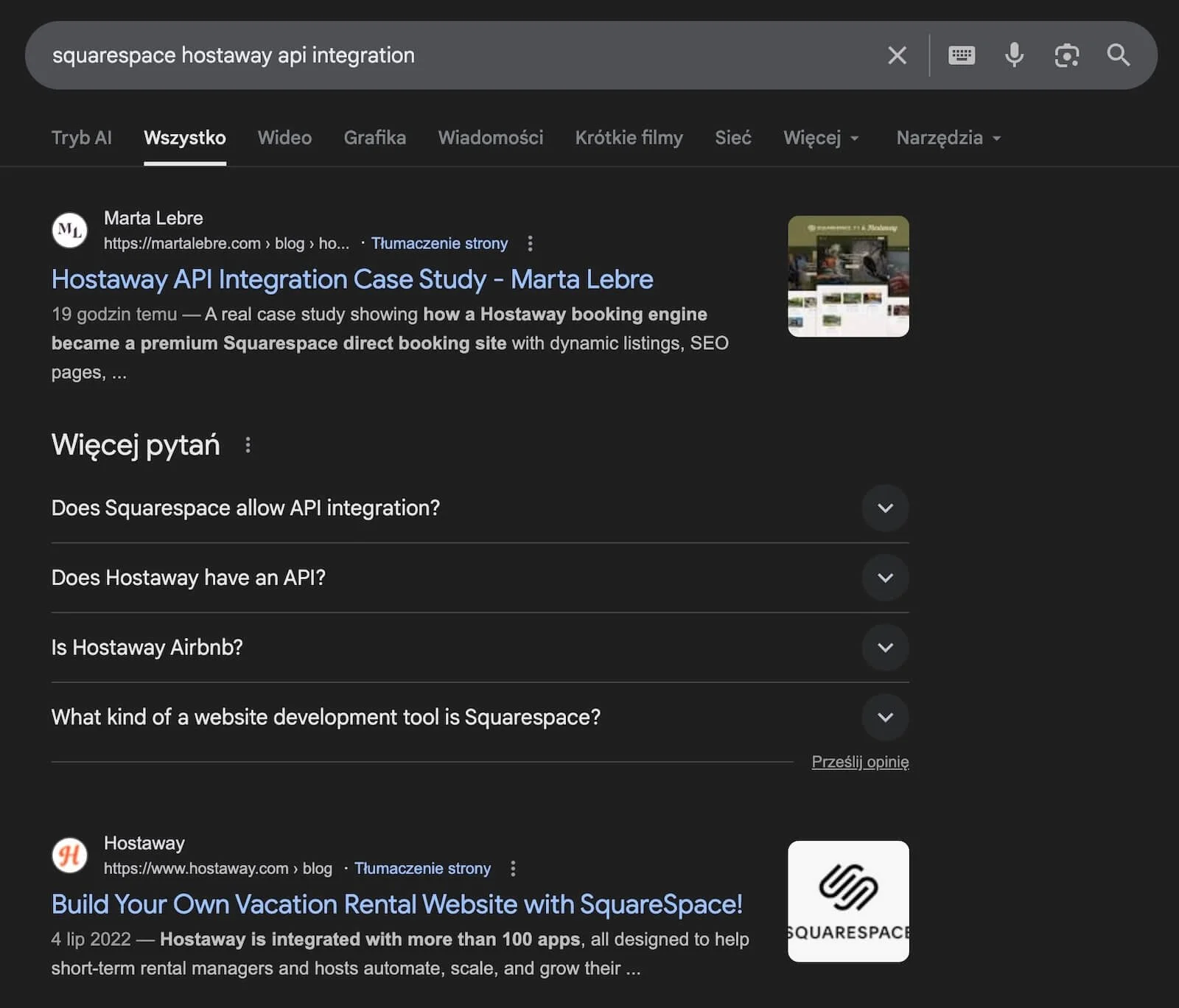
Ranking number 1 on Google in less than 24h!
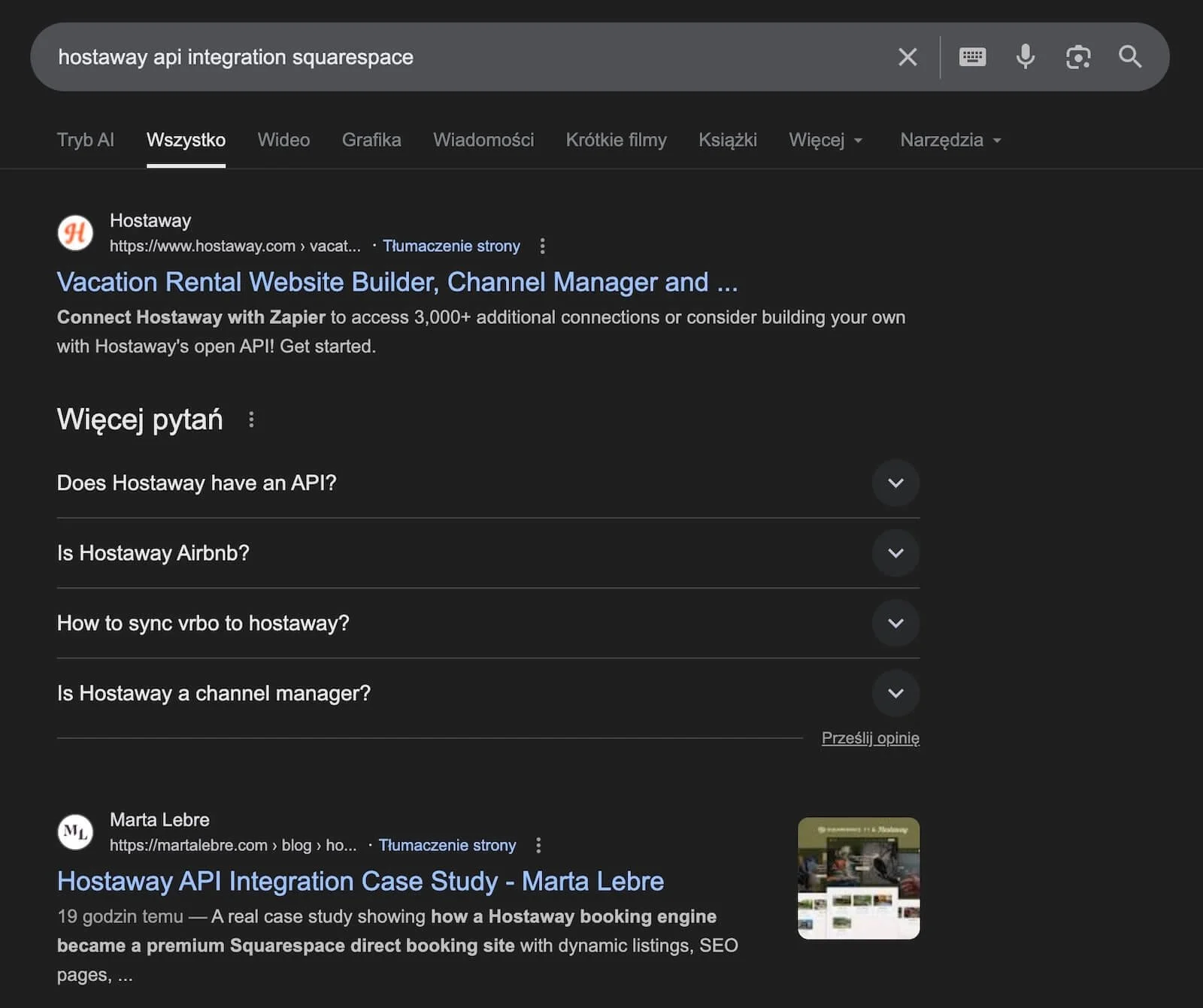
Ranking number 2 on Google in less than 24h!
In this case study, I’m pulling back the curtain on exactly what I did (and what I didn’t do) to achieve first-page dominance in record time. No fluff. No “10 tips to rank higher” listicles. Just the real strategy, actual Google Search Console data, and lessons that'll probably surprise you.
Fair warning: this isn’t your typical SEO advice. I didn’t spend hours in keyword research tools. I used AI to write the post. And the keyword had virtually zero search volume.
But it worked. Fast.
Whether you’re a designer, consultant, or business owner trying to prove that Squarespace can actually rank—or you’re just tired of overthinking SEO—this is your playbook.
Let's dive in.
Why This Squarespace Blog Post Ranked #1 in Less Than 24 Hours
Here’s the thing about ranking on Google: sometimes the perfect SEO opportunity isn't a keyword with 10,000 monthly searches.
Sometimes it’s a keyword with ten searches... where you're the only person on the entire internet providing a real answer.
That’s exactly what happened with my Hostaway API integration case study.
The Perfect Storm
This post hit a sweet spot most SEO strategists dream about but rarely find:
Zero competition + extreme specificity + first-mover advantage = instant ranking
Let me break that down.
1. Zero Competition (Because Everyone Said It Was Impossible)
For years, the Squarespace community has insisted that API integrations aren’t possible. “Squarespace doesn’t support that.” “You can’t integrate third-party tools.” “You need WordPress for that kind of functionality.”
Property managers using Hostaway desperately wanted beautiful, branded direct booking websites. But everyone kept telling them they were stuck with Hostaway's basic booking engine or had to switch platforms entirely.
I built a custom Cloudflare Worker that securely connects Squarespace to the Hostaway API—making dynamic, API-powered vacation rental websites possible on Squarespace.
And then I documented the entire process.
When I published the post, there wasn’t a single comprehensive guide on this topic. Not one. Google had nothing else to show people searching for this solution.
2. Virtually No Search Volume (And Why That Didn't Matter)
The average search volume for "Hostaway API integration Squarespace"? Nearly zero.
But here's what most people don't understand: “nearly zero” never means exactly zero.
It means:
A small but highly motivated audience
People actively searching for solutions (not just browsing)
Zero competition for their attention
Instant authority the moment you publish
Those “ten searches per month”? Those are my dream clients. Property managers with 20+ rental properties, technical problems to solve, and budgets to match.
I’ll take ten high-intent searches over 10,000 tire-kickers any day.

3. Search Intent Alignment = Google’s Dream Scenario
When someone Googles “Hostaway API integration Squarespace,” they want one thing: proof it’s possible and instructions on how to do it.
My post delivered exactly that:
A real client project (Hayward Rentals)
Screenshots of the actual integration
Technical documentation
Step-by-step explanation
4,000+ words of comprehensive detail
Google didn't need to “figure out” where my post belonged. The search intent was crystal clear, and my content was the only answer that matched it perfectly.
4. The Post Was Already Ranking Before Google Search Console Even Knew About It
Here’s something fascinating that nobody talks about: by the time Google Search Console started showing impression data for this post, it was already sitting at position #1 or #2.
I wasn’t waiting around for GSC to validate anything. I was manually checking—literally typing the keyword into Google—and boom. There it was. Top of the page.
What this tells us:
Google’s indexing and ranking happen faster than GSC reporting
When there’s zero competition, Google doesn't need weeks of “evaluation”
Quality signals (comprehensive content, clear structure, technical depth) are instantly recognizable
Squarespace’s technical foundations (fast loading, mobile optimization, clean code) help Google crawl and understand content immediately
The lesson? Don’t wait for data dashboards to tell you what's working. Sometimes the proof is right there in the search results.
What I Actually Did – The Truth About This “SEO Strategy”
Okay, let’s get real about what actually happened here. Because this is where most SEO case studies start lying to you.
I Didn’t Do Traditional Keyword Research (And Here's Why)
You know those blog posts that tell you to spend three hours analyzing keyword difficulty scores, search volume trends, and competitor content gaps?
Yeah, I didn’t do any of that.
Why? Because I created something that didn’t exist yet.
When you build a custom integration that solves a real problem—one that the entire Squarespace community insists “can’t be done”—you don’t need to research keywords. You ARE the keyword.
Here’s what I did know:
Property managers using Hostaway desperately wanted better direct booking websites
Everyone claimed API integrations weren’t possible on Squarespace
I had just built exactly that integration for a real client
There was literally no one else writing about this solution
The search volume? Nearly zero. But I also knew that “nearly zero” searches for a highly specific technical solution meant:
People searching have a real problem
They’re probably willing to pay to solve it
Nobody else is competing for their attention
I could own this topic completely
The lesson: Sometimes the best SEO opportunity isn't found in a keyword tool. It’s found in the work you’re already doing and the problems you're already solving.
I Wrote the Post With AI (Yes, Really)
Let me be honest with you: I didn’t sit at my desk and manually type 4,000+ words from scratch.
Time is money. I’m a busy mom with ADHD. I don’t do that kind of thing.
Here’s what I actually did:
Documented my entire process for the Hayward Rentals project
Outlined the key sections, technical steps, and lessons learned
Fed detailed prompts to AI with my experience, strategy, and insights
Reviewed and edited the output to sound like me
Added screenshots, specific examples, and technical details AI couldn't invent
Refined the structure and flow to match my brand voice
The result? Content that combined:
Real expertise (mine)
Efficient execution (AI)
Depth and comprehensive detail (4,000+ words)
Authentic case study data (actual client project)
Here’s the truth bomb: Google doesn’t penalize AI-assisted writing. It penalizes thin, unhelpful content.
My post was neither thin nor unhelpful. It solved a real problem with genuine technical expertise and detailed documentation. The fact that AI helped me write it faster? Completely irrelevant to Google.
And honestly? Irrelevant to my readers too. They cared about whether the content answered their question—not whether I hand-typed every sentence.
What I Actually Focused On
Instead of traditional SEO research and optimization tricks, I focused on three things:
1. Authority through expertise I built the integration. I lived the process. I documented everything. Nobody else could write this post because nobody else had done this work.
2. Comprehensive documentation Every technical step. Every screenshot. Every lesson learned. Every “here’s how I solved this problem” moment. I went deeper than anyone else could because I was the only one.
3. First-mover advantage Being the first (and only) authoritative source on a topic is the ultimate SEO hack. Google didn't need to compare my content to competitors. There were no competitors.
What I Didn’t Do (And Why That Matters)
Let”s talk about all the “essential SEO tactics” I completely ignored:
❌ I didn’t spend hours in keyword research tools
There was nothing to research. The opportunity was in my client work, not in a spreadsheet.
❌ I didn’t analyze competitor content
There wasn’t any. I was creating the category.
❌ I didn’t build backlinks
Not a single one. The post ranked #1 without any external links pointing to it.
❌ I didn’t promote it on social media initially
I published it and moved on with my day.
❌ I didn’t obsess over keyword density or on-page optimization tricks
I wrote naturally, for humans, and trusted that comprehensive, helpful content would work.
❌ I didn’t manually write every single word from scratch
AI helped. And it was fine.
The real takeaway? When you have genuine expertise and you’re solving a real problem that nobody else is addressing, all those traditional SEO tactics become secondary.
The content does the heavy lifting.
Using Google Search Console to Speed Up Indexing
Even though my post was already ranking before Google Search Console caught up, I still used GSC strategically—because why leave anything to chance?
Here's exactly what I did:
Step 1: Submitted the URL for Indexing Immediately After Publishing
The moment I hit publish, I logged into Google Search Console and manually requested indexing.
How to do this:
Log into Google Search Console
Use the URL Inspection Tool (paste your new blog post URL)
Click “Request Indexing”
Wait 24-48 hours
This tells Google “hey, there’s new content here—come check it out ASAP” instead of waiting for Google to discover it organically through your sitemap.
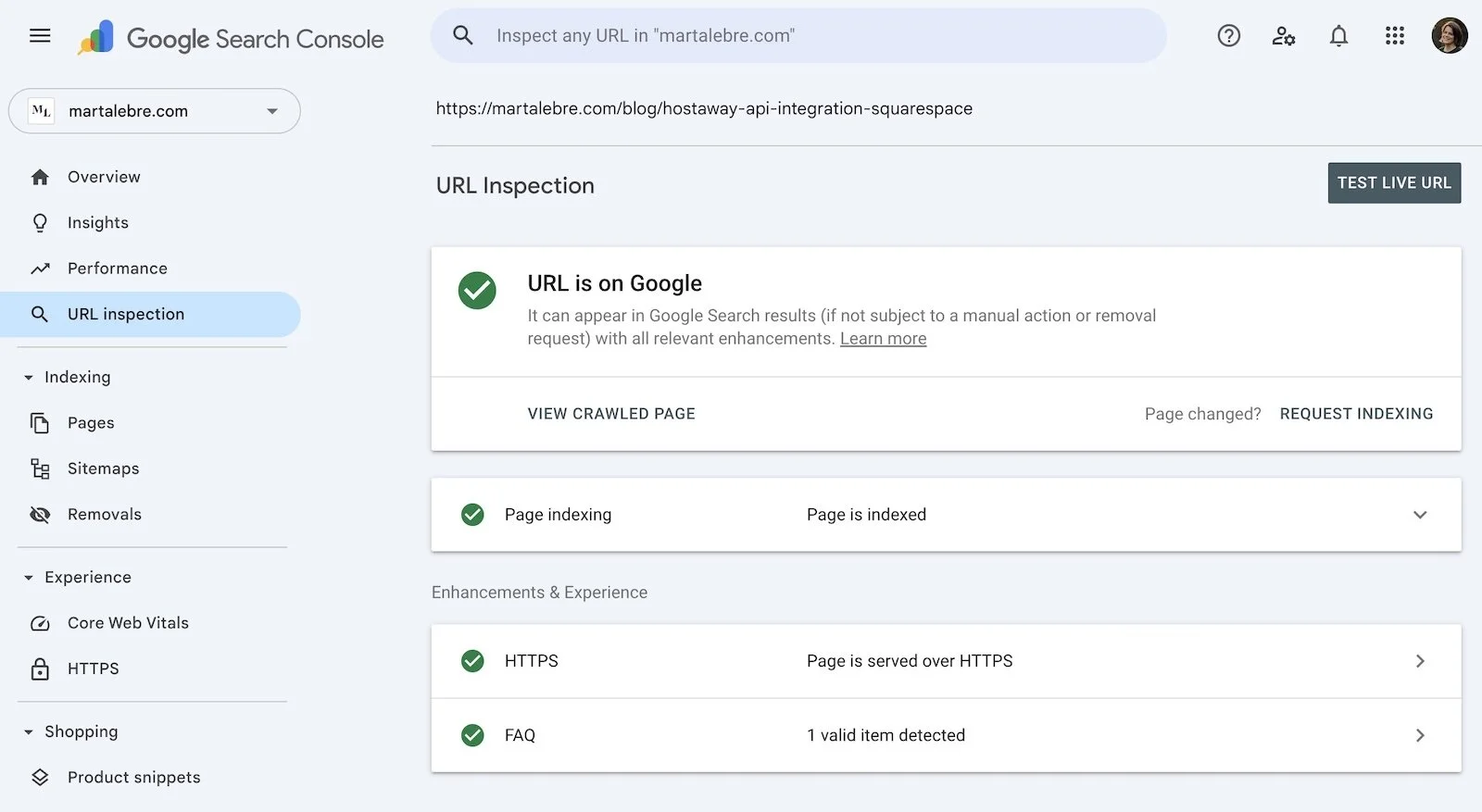
Step 2: Used the URL Inspection Tool to Confirm Crawling
After requesting indexing, I checked back a few hours later to see if Googlebot had actually crawled the page.
The URL Inspection Tool shows you:
Whether the page is indexed
When it was last crawled
Any indexing issues or errors
How Google sees your page (mobile vs desktop)
Everything looked good. Clean crawl, no errors, mobile-friendly—all systems go.
Step 3: Monitored Rankings Manually (Because GSC Lags Behind Reality)
Here’s something most people don’t realize: Google Search Console data lags behind actual rankings by 24-48 hours.
So instead of sitting around waiting for GSC to show me impression data, I just... Googled the keyword myself.
And there it was. Position #1. Less than 24 hours after publishing.
GSC eventually caught up and confirmed what I already knew—but I didn’t need the dashboard to tell me the post was ranking. The search results told me first.
Step 4: Watched for Impression and Click Data
Once GSC started tracking the post (a day or two later), I monitored:
Impressions: How many times the post appeared in search results
Clicks: How many people actually clicked through
Position: Average ranking for the target keyword
Click-through rate (CTR): Percentage of impressions that turned into clicks
The data confirmed what I already saw: the post was ranking #1, getting impressions, and converting those impressions into clicks.
Pro tip: Don’t wait for GSC data to validate your content. Check your rankings manually. Trust what you see in the search results. GSC is useful for tracking trends, not for confirming initial success.
My Squarespace SEO Strategy for Blog Posts (The Framework You Can Steal)
Alright, let’s turn this case study into something you can actually use. Here’s the exact framework I follow when creating blog content designed to rank on Squarespace.
Step 1: Solve a Real Problem (Preferably One No One Else Is Solving)
The best SEO opportunities aren't found in keyword tools. They're found in your actual work.
Ask yourself:
What problems am I solving for clients that nobody else is addressing?
What questions do people keep asking me that have no good answers online?
What technical solutions have I built that the community thinks are “impossible”?
Where is there a gap between what people need and what's available?
Don't be afraid of “low volume” keywords. If you're solving a real problem for a specific audience, even ten searches per month can turn into high-value clients.
Example: Nobody was writing about Hostaway + Squarespace API integration because everyone assumed it couldn’t be done. I built it, documented it, and owned the topic completely.
Step 2: Write Comprehensive, Genuinely Helpful Content
Once you’ve identified your topic, go deeper than anyone else. Or in my case, be the only one covering it.
What “comprehensive” actually means:
Real examples and case studies (not hypothetical scenarios)
Screenshots and visual documentation
Technical details and step-by-step processes
Lessons learned from actual experience
Honest commentary about what worked and what didn't
Don’t stress about writing it all yourself. Use AI to help you execute faster—but make sure you’re injecting your expertise, personality, and real-world experience. AI is a tool, not a replacement for knowing what you're talking about.
Target length: 2,000–5,000 words for pillar content. Not because “longer is better,” but because comprehensive coverage requires depth.
Step 3: Optimize the Basics (But Don't Overthink It)
Here's where I keep things simple. Squarespace handles most technical SEO automatically, so you just need to nail the on-page fundamentals:
✅ Title tag (H1)
Include your target keyword near the front
Keep it under 60 characters
Make it compelling (people need a reason to click)
Example: “How I Ranked This Squarespace Blog Post #1 on Google in Less Than 24 Hours”
✅ Meta description
Summarize what the post covers
Include your target keyword naturally
Keep it under 155 characters
Write it like an ad (this is your sales pitch in search results)
✅ URL slug
Keep it short and keyword-focused
Remove unnecessary words
Use hyphens between words
Example: /squarespace-blog-seo-case-study
✅ Heading structure
One H1 (your title)
Multiple H2s to organize main sections
H3s for subsections when needed
Keep headings clear and descriptive
✅ Internal links
Link to 2–5 relevant pages on your site
Use natural anchor text
Help readers (and Google) discover related content
✅ Image optimization
Compress images before uploading (I use TinyPNG or Squarespace’s built-in compression)
Use descriptive file names (not “IMG_1234.jpg”)
Add alt text that describes the image (bonus if it naturally includes keywords)
That’s it. Don’t stress about keyword density, don't obsess over perfect word counts, and definitely don’t try to “hack” your way to the top with weird SEO tricks.
Just write helpful content and get the basics right.
Step 4: Let Squarespace Handle the Technical SEO
Here’s the part where Squarespace actually shines: it handles almost all the technical SEO automatically.
Without you lifting a finger, Squarespace provides:
SSL certificates (HTTPS)
Mobile optimization and responsive design
Automatic XML sitemap generation
Clean, semantic HTML code
Fast page loading (especially with proper image optimization)
Structured URLs
Built-in Google Analytics and Search Console integration
You don’t need plugins. You don't need to worry about code bloat. You don’t need to constantly update security patches.
Squarespace just... works.
Your job: Focus on content and on-page optimization. Let Squarespace handle the rest.
Step 5: Publish, Index, Monitor
Once your post is ready:
1. Hit publish
Don’t overthink it. Done is better than perfect.
2. Submit the URL to Google Search Console
Request indexing manually to speed things up.
3. Check rankings manually within 24-48 hours
Don’t wait for GSC data. Just Google your keyword and see where you land.
4. Monitor GSC for impressions, clicks, and position over the next few days
This gives you real data on how the post is performing.
5. Update and refine over time
As you get questions, feedback, or new insights—add them to the post. Fresh, updated content signals to Google that your post is current and maintained.
Squarespace SEO Tips Based on a Real Case Study
Let's clear up some myths and share what actually works—based on real results, not theory.
✅ Squarespace is NOT an SEO Disadvantage
This post ranked #1 in under 24 hours. On Squarespace. With no backlinks. No promotion. No SEO plugins.
The platform doesn’t hold you back. In fact, Squarespace's clean code, automatic technical SEO, and fast performance actually help you rank.
Stop blaming the platform. Focus on the content.
✅ Zero Search Volume Doesn’t Mean Zero Opportunity
“Nearly zero” searches for a highly specific keyword can be more valuable than 10,000 searches for a generic term.
Why? Because those searchers have a real problem, clear intent, and they're ready to take action (often to hire someone).
Don't dismiss low-volume keywords if they align with your expertise and your ideal clients.
✅ First-Mover Advantage is Massive
Be the first (and best) person to comprehensively cover a niche topic, and Google has no choice but to rank you.
There’s no competition to beat. No endless link-building campaigns. No waiting months for authority to build.
You just... win.
✅ AI-Assisted Writing is Fine—If You Add Real Expertise
Google doesn’t care whether you wrote your content by hand or used AI. It cares whether the content is helpful, accurate, and valuable.
Use AI to speed up execution. But inject your expertise, experience, and personality. That's what makes the content worth ranking.
✅ You Don’t Need Backlinks to Rank Fast
For low-competition or zero-competition keywords, content quality and first-mover advantage beat link building every time.
My post ranked #1 without a single backlink. Because there was no competition, and the content was genuinely the best (only) answer.
Backlinks matter for competitive keywords. But if you’re strategic about topic selection, you can rank without them.
✅ Manual Ranking Checks Beat Waiting for GSC Data
Google Search Console is useful for tracking trends over time. But it lags behind reality by 24-48 hours.
If you want to know whether your post is ranking right now, just Google it yourself.
Don't wait for a dashboard to tell you what you can confirm in ten seconds.
✅ Squarespace’s Technical Foundations Do the Heavy Lifting
Clean code. Fast loading. Mobile optimization. Automatic sitemaps. SSL. Structured URLs.
All of this happens automatically on Squarespace, and it’s exactly what Google needs to crawl, index, and rank your content quickly.
You don’t need to be a developer. You just need to focus on creating great content.
Lessons Learned – What Really Drives Fast Rankings
Let’s distill everything into the core lessons that matter most:
1. Expertise + Documentation = Instant Authority
When you document something you actually built, experienced, and figured out, Google recognizes genuine authority.
You’re not regurgitating someone else's blog post. You’re not theorizing. You’re sharing real expertise.
That's the kind of content Google wants to rank.
2. Zero Competition > Low Competition
I wasn’t fighting my way to position #1. I was creating position #1.
When you’re the only authoritative source on a topic, ranking is inevitable. Google doesn’t have to choose between you and ten competitors. You’re the only option.
This is why first-mover advantage is so powerful.
3. Search Intent Alignment Still Wins
My post answered exactly what someone searching “Hostaway API integration Squarespace” wanted to know:
Is it possible? (Yes.)
How do you do it? (Here's the entire process.)
Can I see proof? (Here's a real client project.)
Perfect intent alignment = instant ranking.
4. Squarespace’s Built-In Technical SEO is Underrated
Clean code. Fast loading. Mobile-first design. Automatic sitemaps. SSL.
These aren’t “nice to have” features. They’re foundational SEO requirements—and Squarespace handles all of them automatically.
Stop worrying about the platform. Focus on the content.
5. AI Can Speed Up Content Creation Without Hurting SEO
The key is using AI as a tool to execute your expertise faster—not replace your expertise.
Feed AI your ideas, experience, and structure. Then edit, refine, and add the human touches that only you can provide.
Efficiency doesn’t mean sacrificing quality.
6. Google Ranks Content Faster Than You Think
When your content is clearly the best (or only) answer to a search query, Google doesn’t need weeks to evaluate it.
My post was ranking #1 before Google Search Console even started tracking it.
Quality signals matter more than “aging” content.
7. The Platform Doesn’t Matter—The Content Does
Squarespace. WordPress. Webflow. Wix. Shopify.
Google doesn’t care what CMS you use. It cares whether your content solves problems, answers questions, and provides value.
Stop letting platform debates distract you from creating great content.
Conclusion: It’s the Content That Ranks (And Squarespace Doesn’t Get in the Way)
Ranking a Squarespace blog post #1 on Google in under 24 hours wasn’t about hacks, tricks, or gaming the system.
It was about creating something genuinely valuable that nobody else had created.
I built a custom integration the Squarespace community insisted was impossible. I documented the entire process in comprehensive detail. I used AI to help me write efficiently (because who has unlimited time?). And I published it on a platform people love to say “can’t rank.”
The result? Position #1 before Google Search Console even started tracking impressions.
The lesson? Stop worrying about whether Squarespace is “good enough” for SEO. Stop obsessing over search volume and keyword difficulty. Stop waiting for the “perfect” backlink strategy.
Start creating content based on real expertise that solves real problems—even if only ten people per month are searching for it.
Because here’s the truth: those ten people are probably your dream clients.
And when you're the only person answering their question? Google doesn’t need to think twice about where to rank you.
Ready to Build a Squarespace Website That Actually Ranks?
If you want a website that looks beautiful, functions flawlessly, and shows up on Google when your ideal clients are searching—I can help.
Whether you need a custom design, a premium template, or expert SEO strategy, I build Squarespace sites designed for real results.
👉 Explore my templates
👉 Explore my Squarespace SEO services
👉 Work with me directly
Your website can be your most profitable marketing asset.
Let's make it rank.
FAQs: Ranking a Squarespace Blog Post Fast on Google
-
Yes — and this case study proves it. Squarespace itself is not a ranking limitation. When a blog post perfectly matches search intent, has zero or near-zero competition, and provides the best (or only) answer available, Google can rank it extremely fast — sometimes within hours of publishing.
-
Squarespace is absolutely good for SEO. It handles critical technical foundations automatically, including mobile optimization, SSL, clean HTML, fast loading, and XML sitemaps. SEO success depends far more on content quality and search intent alignment than on the CMS you use.
-
Not always. For low-competition or first-mover keywords, backlinks are not required to rank quickly. This post ranked #1 without any backlinks because there were no competing authoritative resources for the same search query.
-
Traditional keyword research is helpful for competitive topics, but it’s not always necessary. In this case, the opportunity came from solving a real problem that no one else had documented. When you create original content for an underserved query, you often become the keyword.
-
Not at all. Low search volume often means high intent and low competition. A keyword with 5–10 searches per month can be far more valuable than a high-volume keyword if the people searching are actively looking for a solution — especially in B2B or technical niches.
-
No. Google does not penalize AI-assisted content. It penalizes unhelpful, thin, or low-quality content. As long as AI is used to support real expertise, original insights, and genuine problem-solving — as in this case study — it does not negatively affect rankings.
-
It depends on competition and search intent. For competitive keywords, ranking can take months. For highly specific, low-competition keywords with clear intent, a Squarespace blog post can rank within hours or days after publishing — especially when indexing is requested via Google Search Console.
-
Google Search Console doesn’t influence rankings directly, but requesting indexing can speed up discovery. In this case, the post was already ranking before GSC data appeared, which shows how fast Google can evaluate and rank content when competition is minimal.
-
The content — always. Google doesn’t rank platforms; it ranks answers. When content demonstrates expertise, authority, and relevance, it can rank on any modern CMS, including Squarespace, WordPress, Webflow, or Shopify.
-
The principles are replicable — solving real problems, writing comprehensive content, and targeting underserved queries. However, fast rankings like this are easiest to achieve when you’re documenting real experience or expertise that others don’t have.
-
First-mover advantage beats SEO tricks. When you create the best (or only) authoritative resource for a specific problem, Google has no reason not to rank you — regardless of platform, backlinks, or search volume.