
How to Build a Direct Booking Website for Your Short Term Rental in a Weekend (Using Squarespace + Lodgify)
Looking to build a direct booking website for your vacation rental? This guide shows how you can create one using Squarespace and Lodgify, so you can reduce Airbnb fees, own your bookings, and launch a professional vacation rental website in a single weekend.
A client of mine owns a beautiful condo in a spectacular location. While we were working on her website, she casually shared something that stopped me in my tracks.
Airbnb was taking nearly $10,000 a year in fees.
Not cleaning.
Not maintenance.
Not upgrades guests actually notice.
Just platform fees.
That money could have gone into renovations, better furnishings, or improvements that justify higher nightly rates. Instead, it was going to a platform she doesn’t own and can’t control.
This is a moment many short-term rental owners eventually reach.
Airbnb and Vrbo are great for visibility, especially at the beginning. But over time, fees add up, margins shrink, and you realize your business lives entirely inside someone else’s system.
That’s where a direct booking website comes in.
Building one doesn’t mean abandoning Airbnb. It means adding a booking channel you control — one that reduces fees, builds a real brand, and works alongside OTAs.
In this guide, I’ll show you how to build a direct booking website using Squarespace and Lodgify, in a way that’s realistic, scalable, and doable in a single weekend.
Affiliate disclosure: Some of the tools and resources mentioned in this post may include affiliate links. That means I may earn a small commission if you sign up — at no extra cost to you. I only recommend tools I actually use and trust for building direct booking websites.
Table of Contents
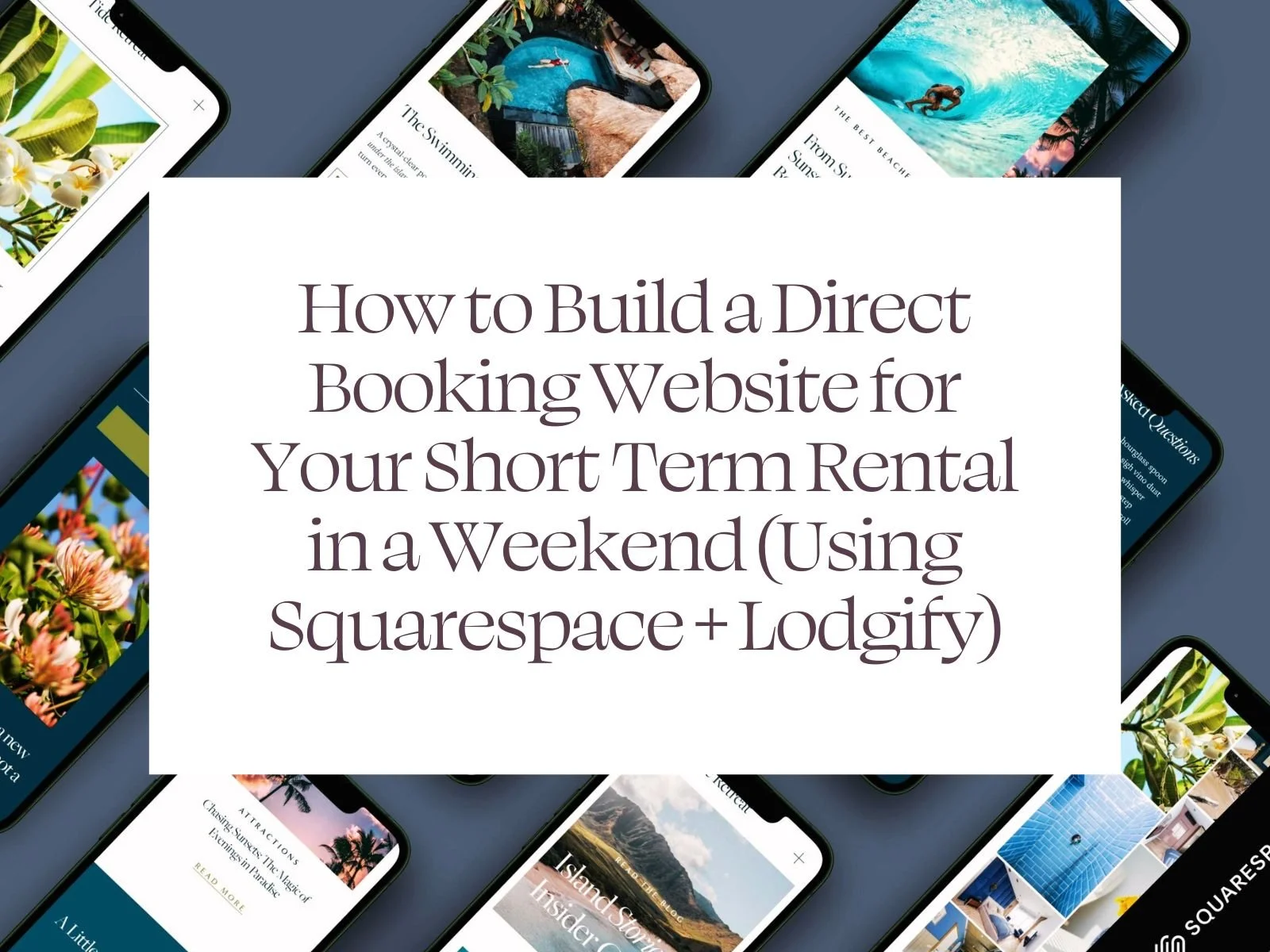
What Is a Direct Booking Website (And Why Vacation Rentals Need One)
A direct booking website is a website where guests can book your vacation rental directly with you, without going through platforms like Airbnb or Vrbo.
Instead of sending guests to a marketplace listing, your website becomes the place where they:
learn about your property
check availability
and complete a booking
For short-term rental owners, a direct booking website is not a replacement for Airbnb — it’s a complement. Airbnb and Vrbo can still bring discovery and first-time guests, while your direct booking website captures repeat bookings, referrals, and organic traffic without platform fees.
At its core, a direct booking website does three things:
Shows your property in a professional, branded way
Allows guests to book directly through a connected booking system
Gives you full control over pricing, policies, and communication
When built well, a direct booking website for vacation rentals feels just as trustworthy as Airbnb — often more so — while keeping the relationship (and revenue) in your hands.
Why Vacation Rentals Need a Direct Booking Website
Relying only on Airbnb or Vrbo means your business lives on borrowed land. Fees increase, rules change, listings disappear, and visibility depends on algorithms you don’t control.
A direct booking website gives vacation rental owners stability and long-term growth.
Here’s why more owners are investing in direct booking websites:
Lower fees: Direct bookings reduce or eliminate platform commissions
More control: You decide pricing, minimum stays, policies, and branding
Stronger guest trust: A professional website builds confidence
Repeat bookings: Guests can book again without going back to Airbnb
Better margins: Money saved on fees goes back into the property
A clean direct booking website builder setup — like Squarespace for the website and Lodgify for bookings — makes this realistic even if you’re not technical.
Direct Booking Website vs Airbnb: The Real Difference
The biggest difference between Airbnb and a direct booking website is ownership.
With Airbnb, you’re renting space on a marketplace.
With a direct booking website, you’re building a brand asset you control.
Your website can rank on Google, be shared directly with guests, linked from social media, and reused year after year — without paying per-booking fees to a third party.
That’s why for many owners, the question isn’t “Should I build a direct booking website?”
It’s “Why didn’t I do this sooner?”
Squarespace + Lodgify: The Cleanest Way to Build a Direct Booking Website
If you want a direct booking website that looks professional, ranks on Google, and converts guests, the cleanest setup is Squarespace + Lodgify.
This works because each tool does one job extremely well:
Squarespace handles the website: design, branding, pages, SEO, trust
Lodgify handles bookings: availability, pricing, payments, reservations
Together, they create a seamless direct booking website for short-term rentals that feels just as easy to use as Airbnb — without the platform fees.
What Squarespace Does (The Website Layer)
Squarespace is where your direct booking website lives. It’s the front-facing experience guests see when they land on your site.
Squarespace handles:
Your homepage and property pages
Photos, copy, amenities, and policies
SEO-friendly URLs and structure
Mobile-first layouts (critical for bookings)
Trust signals like reviews, FAQs, and guides
This is where guests decide whether they trust your property enough to book. A well-designed Squarespace vacation rental website instantly feels more credible than a generic booking page — especially for higher-value stays.
What Lodgify Does (The Booking Engine)
Lodgify isn’t your website — it’s your booking system.
It handles:
Real-time availability
Rates and minimum stays
Secure payments
Booking confirmations
Syncing with Airbnb and Vrbo
Instead of forcing booking logic into your website builder, Lodgify runs quietly in the background as the engine powering direct bookings. This separation is intentional — and very effective.
How the Squarespace + Lodgify Integration Works
Here’s how a direct booking website actually works:
A guest lands on your Squarespace website
They browse photos and details
Lodgify booking widgets show availability
The guest selects dates and books
Lodgify processes the payment
To the guest, it feels like one website. Behind the scenes, each tool is doing what it does best.
Why Templates Make This Setup Even Easier
The biggest mistake owners make with this setup is starting from a blank page.
A Squarespace vacation rental template designed for direct bookings already accounts for:
Where booking widgets belong
How guests move from browsing to booking
What builds trust and reduces hesitation
Mobile behavior and conversion flow
Instead of reinventing the wheel, you start with a proven structure and plug Lodgify straight in.
Your Direct Booking Website Weekend Building Blueprint
You don’t need months. You don’t need custom code. You need a clear plan.
Step 1: Start Smart with a purpose-built vacation rental template (Seriously)
I know the blank canvas approach seems tempting, but starting with a professionally designed template is hands-down the smartest move you can make.
Templates give you a head start with proven layouts, optimized user flows, and design elements that actually convert.
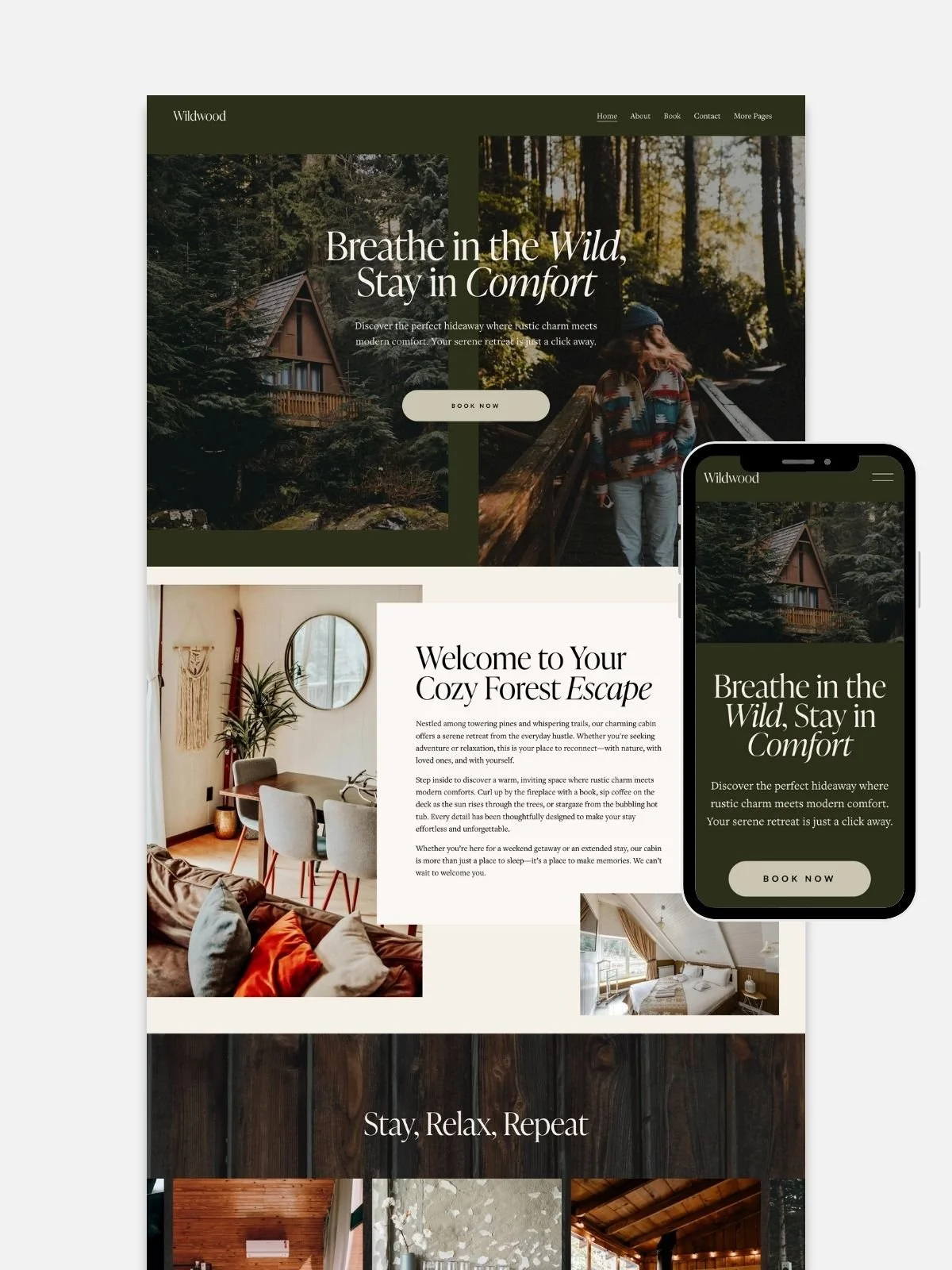
I happen to create vacation rental website templates (shameless plug, but they're really good!), and one of my bestsellers is Wildwood - it’s specifically designed for short-term rentals with all the elements you need: stunning photo galleries, integrated booking systems, guest testimonials, and local area highlights.
The best part? You're not starting from scratch, so you can focus on customizing rather than creating.
Whether you choose Wildwood or another template, make sure it includes:
Hero sections that showcase your property's best features
Gallery layouts that make your photos shine
Booking call-to-action buttons in strategic locations
Mobile-responsive design (because 60% of bookings happen on phones)
Clean, professional aesthetics that build trust
Check my Vacation Rental Website Templates for Squarespace 7.1

Step 2: Set Up Your Squarespace Foundation
Once you've chosen your template, it's time to make it yours:
1. Customize your branding: Upload your logo, choose colors that reflect your property's personality, and select fonts that feel welcoming. Remember, you're not just selling a place to stay - you're selling an experience.
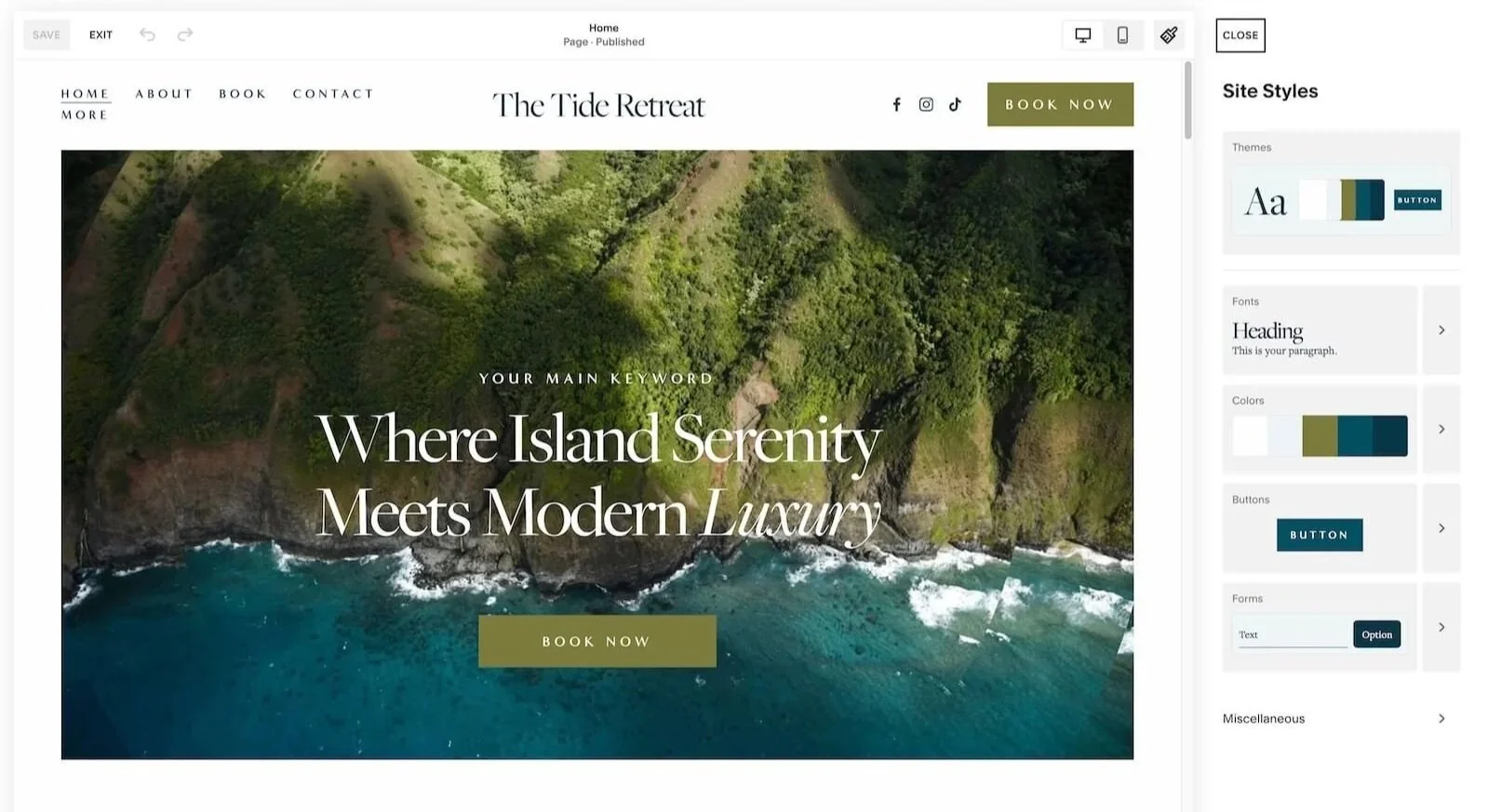
2. Create your essential pages: Your website needs a solid structure. Start with these must-haves:
Homepage (your property's first impression)
About page (your story and what makes you special)
Amenities (all the wonderful details that make guests choose you)
Location / Recommendations (why your neighborhood rocks)
Contact (make it easy for guests to reach you)
3. Optimize your images: This step is crucial! Compress your photos so they load quickly, but keep them high-quality enough to showcase your property's beauty. Slow websites kill conversions faster than you can say "booking abandoned."
Step 3: Create Content That Converts
Your words are just as important as your design. Here's how to write copy that turns browsers into bookers:
1. Tell your property's story
What makes your place special? Is it the vintage clawfoot tub? The view of the mountains? The fact that you've hosted families for five years running? Share the details that make guests excited to stay with you.
2. Highlight local experiences
Guests aren't just booking a bed - they're booking a location. Create content about nearby restaurants, hiking trails, museums, or that amazing coffee shop around the corner. Position yourself as their local insider.
3. Build trust strategically
Include guest testimonials, highlight your superhost status, mention your quick response time, and showcase any certifications or awards. Trust is the currency of direct bookings.
4. Set clear expectations
Happy guests leave great reviews. Include house rules, check-in procedures, and what guests can expect during their stay. Clarity prevents confusion and negative feedback.
All my short-term rental Squarespace templates include a bonus AI copy prompts that will help you create compelling website copy in a few minutes. Who has time for staring at a blinking coursor on a blank screen?
Step 4: Integrate Lodgify Like a Pro
Here's where your website transforms from pretty brochure to booking machine:
Set up your Lodgify account: Create your property profile with accurate details, upload your calendar, and configure your rates. Take time to set up different pricing for weekdays, weekends, and special events - your future self will thank you.
Install the booking widgets: Lodgify provides code snippets that you'll embed into your Squarespace pages. Don't panic - it's just copy and paste! Place booking calendars on your homepage and dedicated booking page for maximum visibility.
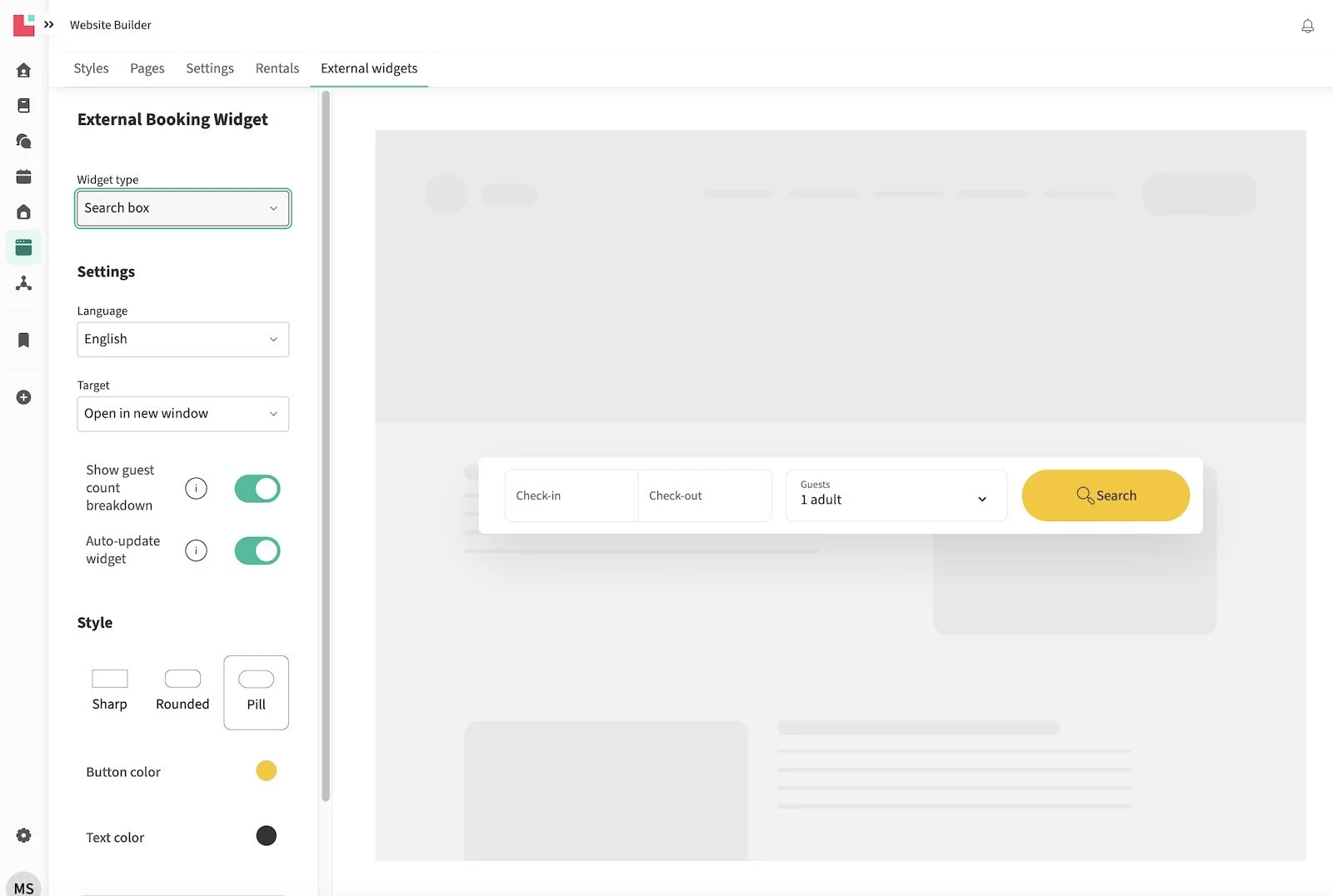
1. Inside your Lodgify Dashboard, go to Website Builder > External Booking Widgets. Customize your booking widget to match your brand’s style and scroll a little down to click the greenish Generate Code button.
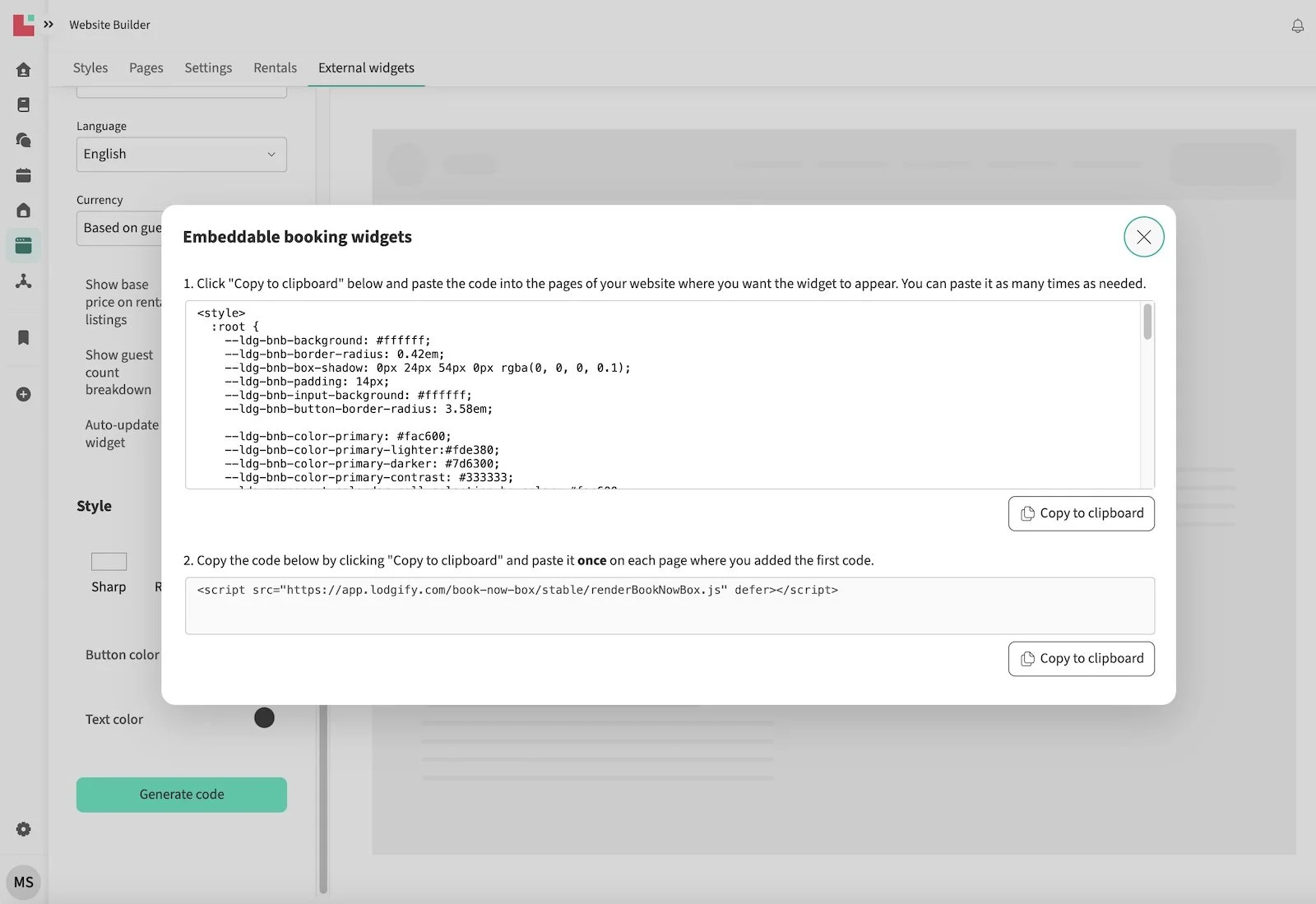
2. Copy both pieces of code.
3. In your Squarespace dashboard, go to Pages > Edit and select the page where you want the widget to appear. Add a code block and paste the code into it.
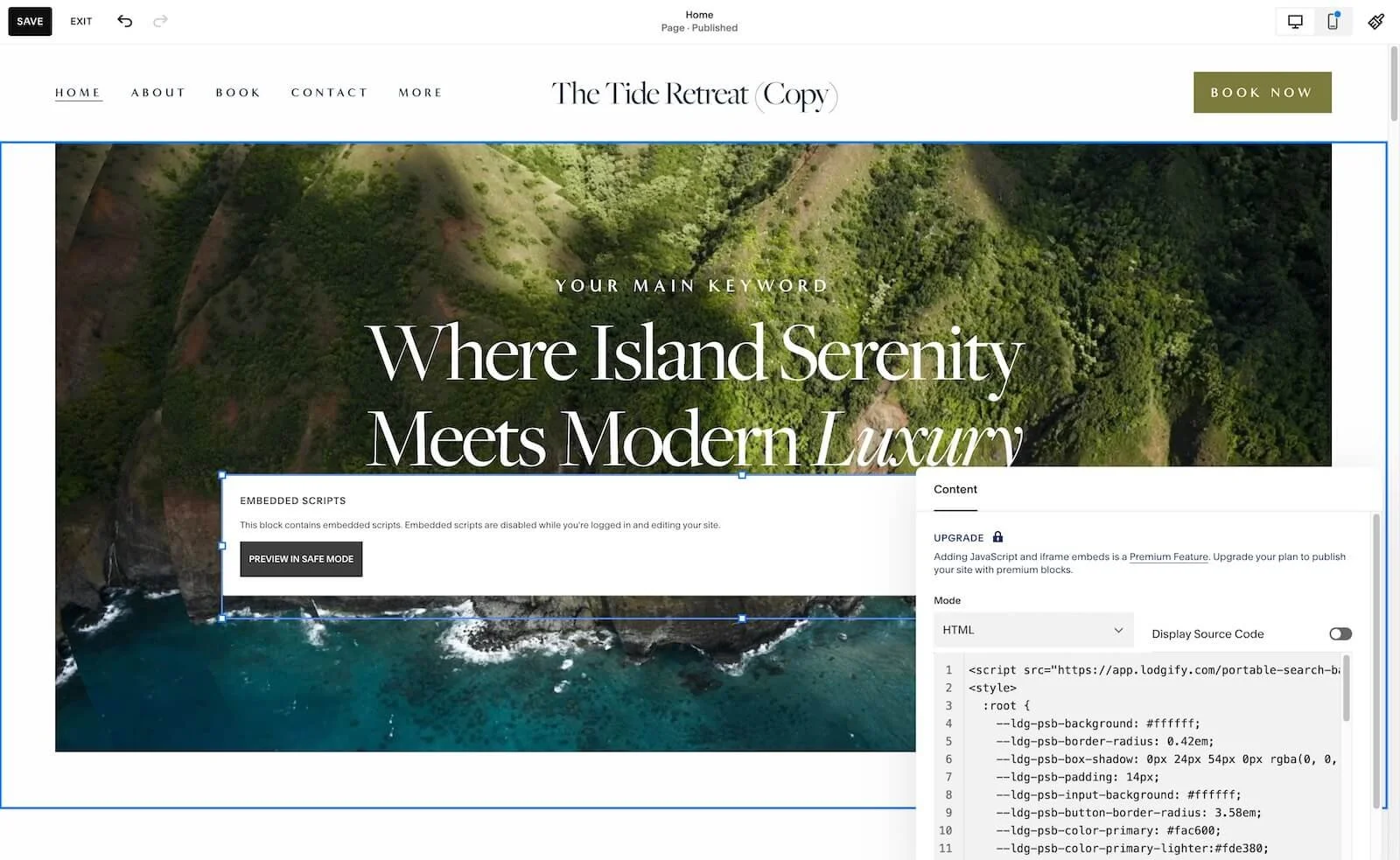
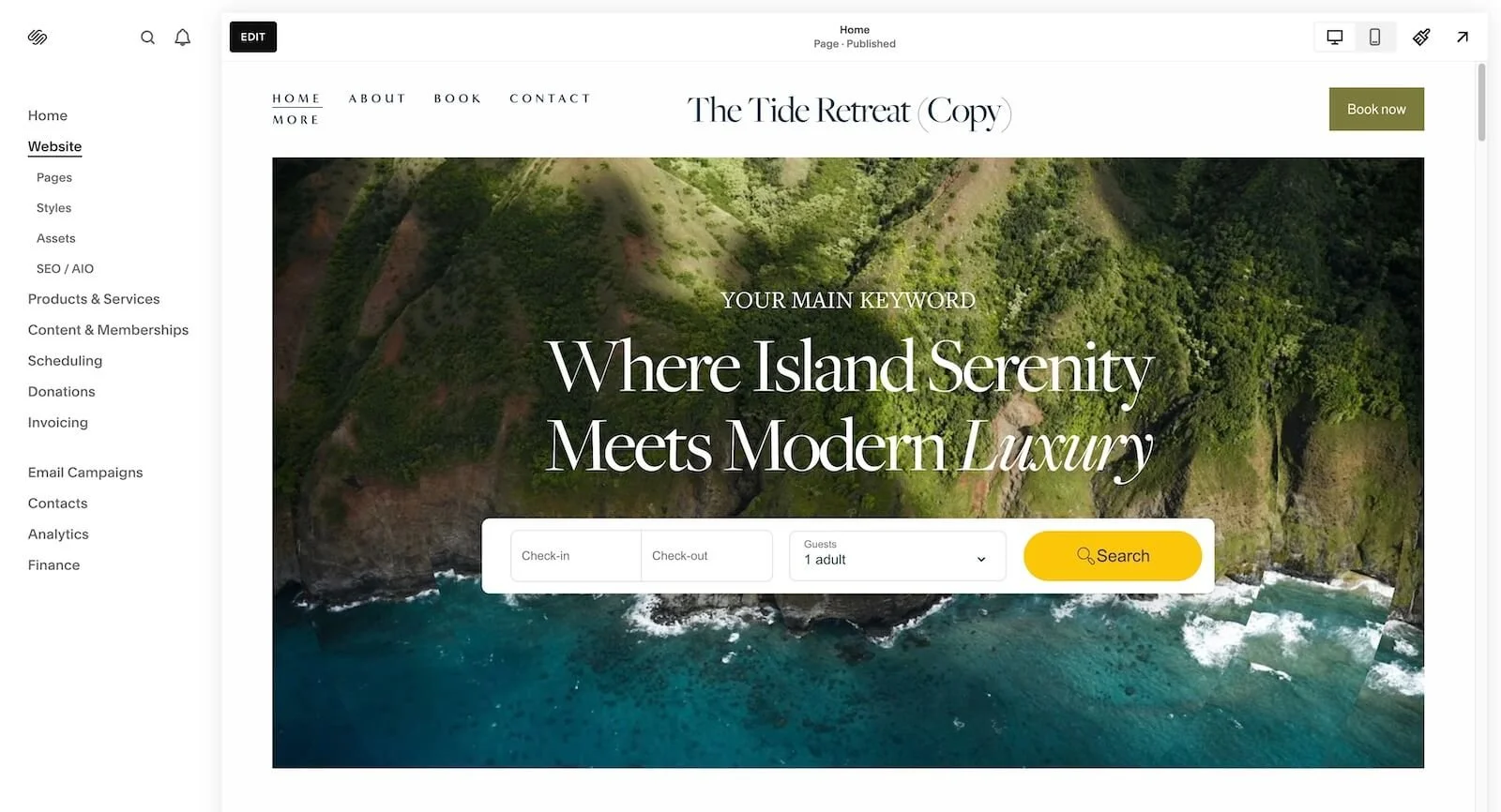
4. Adjust the code block width and hit save. You have just installed your Lodgify widget :)
Configure payment processing: Set up secure payment options that make guests feel confident about booking. Multiple payment methods mean more bookings - it's that simple.
Test everything twice: Click through the entire booking process as if you're a guest. Does everything work smoothly? Are confirmation emails sending? Is the calendar updating correctly? Better to catch hiccups now than after launch.
SEO for Direct Booking Websites: How Guests Find You on Google
A direct booking website only works if guests can actually find it. The good news is that SEO for direct booking websites is far simpler than most owners expect — especially when you’re not trying to compete with Airbnb or Booking.com.
You’re not ranking for massive global terms. You’re ranking for high-intent, location-based searches, like:
“2 bedroom condo in Kihei”
“pet-friendly vacation rental in [location]”
“family-friendly short-term rental near [attraction]”
A well-structured Squarespace vacation rental website can absolutely rank for these searches when the basics are done right.
The 3 SEO Essentials for a Direct Booking Website
A high-performing Squarespace direct booking website needs three things working together:
1. Clear search intent: Guests search by location, property type, and experience — not industry terms. Your pages should naturally include your location, who the rental is for, and what makes it special.
2. Clean page structure: Google needs clarity. A strong direct booking website includes:
One main homepage focused on your location
Clear property or listing sections
Supporting pages like Amenities, Location, FAQs, and Contact
Squarespace already handles the technical foundation (mobile-first, SSL, clean URLs), which removes a lot of complexity.
3. Trust signals that support rankings and bookings: Reviews, clear policies, local content, and real photos keep guests on your site longer — and that helps both conversions and SEO.
Local SEO: Your Built-In Advantage
Airbnb listings can’t publish long-form content or build authority around a specific area. Your Squarespace vacation rental website can.
Even simple additions like:
A dedicated location page
Mentions of nearby landmarks and attractions
Local tips or recommendations
can make a meaningful difference in search visibility over time.
A Quick Note on Structured Data (Optional)
Structured data (like FAQ or lodging schema) helps Google better understand your site. It’s not required to launch, but it’s a smart upgrade once your direct booking website is live and getting traffic.
Interested in vacation rental SEO? Read more here…
Why Using a Squarespace Template Is the Smartest Way to Launch Faster
When you’re building a Squarespace vacation rental website, speed matters — but not at the expense of quality. Most short-term rental owners don’t need a fully custom website from day one. What they need is a professional, conversion-ready Squarespace direct booking website that works now and can grow later.
That’s where templates come in.
A well-built Squarespace template gives you a proven structure, clear booking flow, and a polished design — without months of back-and-forth, technical decisions, or unnecessary risk.
Direct Booking Website: Templates vs Custom Design
| Factor | Squarespace Template | Custom Website Design |
|---|---|---|
| Upfront Cost | ✔ Low to moderate ✔ One-time template purchase |
❌ High upfront cost ❌ Often several thousand dollars |
| Time to Launch | ✔ Days or a single weekend | ❌ Weeks or months |
| Technical Complexity | ✔ Low ✔ No custom code required |
❌ High ❌ Developers or agencies often required |
| Decision Fatigue | ✔ Minimal ✔ Structure already defined |
❌ High ❌ Every layout and feature must be decided |
| Design & Conversion Risk | ✔ Low risk ✔ Proven booking-focused layouts |
❌ Higher risk ❌ Success depends on testing and experience |
| Booking Flow | ✔ Pre-planned for direct bookings ✔ Easy Lodgify integration |
❌ Must be designed and tested from scratch |
| SEO Structure | ✔ SEO-ready page hierarchy ✔ Clean URLs and structure |
❗ Varies ❗ Depends on SEO knowledge of the team |
| Scalability | ✔ Easy to expand for more listings | ❗ Possible, but often requires redesign |
| Ongoing Maintenance | ✔ Simple and owner-friendly | ❌ Ongoing support often needed |
| Best For |
• Fast launch • Lower risk • Direct booking focus • Owners who want control without complexity |
• Large budgets • Highly specific requirements • Established brands with in-house support |
For most short-term rental owners, a Squarespace direct booking website template offers the best balance of speed, cost, and low risk — with the option to go custom later once direct bookings are already flowing.
What High-Converting Direct Booking Website Templates Include
Not all templates are created equal. A high-performing Squarespace vacation rental website template is designed around how guests actually behave — not just how a site looks.
Here’s what a strong direct booking template already accounts for:
Clear booking flow
Strategic placement for Lodgify booking widgets so guests always know how to check availability and book.Trust-first layout
Space for reviews, policies, FAQs, and reassurance elements that reduce hesitation before booking.Conversion-focused property pages
Room for galleries, amenities, location details, and highlights that answer guest questions upfront.Mobile-optimized design
Built for phones first, where most direct bookings happen.SEO-ready structure
Clean URLs, logical page hierarchy, and layouts that support a Squarespace direct booking website ranking on Google.Scalable layout for multiple listings
Easy to expand if you add more properties later — without redesigning your entire site.Brand flexibility
Fonts, colors, and spacing that can be customized without breaking the layout or booking flow.
The biggest advantage? You’re not guessing.
Instead of wondering where to place a booking button or how much information is “too much,” you start with a structure that’s already designed for direct bookings, guest trust, and clarity.
That’s why templates are often the fastest, safest way to launch a Squarespace vacation rental website — especially when paired with Lodgify as your booking engine.
Read more about the Vacation rental Squarespace templates…
Who This Direct Booking Setup Is Perfect For
A Squarespace direct booking website isn’t for every vacation rental owner — and that’s a good thing. This setup works best for owners who want more control, better margins, and a professional online presence that grows with their business.
Here’s who this direct booking website setup (Squarespace + Lodgify) is ideal for.
1. Vacation Rental Owners Ready to Reduce Airbnb Fees
If you’re already getting bookings on Airbnb or Vrbo but are tired of paying high platform fees, a direct booking website is the logical next step.
This setup is perfect if you:
Want to keep more revenue per booking
Plan to send repeat guests to your own site
Want a booking channel you actually control
A Squarespace vacation rental website allows you to capture bookings directly while still using OTAs for exposure — without putting all your eggs in one basket.
2. Hosts Who Want a Professional, Trust-Building Website
Guests are more likely to book directly when a website feels credible, polished, and easy to use.
This setup is ideal if you want:
A website that looks like a real brand, not a generic booking page
Clear property pages, policies, and FAQs
A smooth booking experience that feels just as trustworthy as Airbnb
A Squarespace direct booking website gives you full control over design and content, which plays a huge role in guest confidence.
3. Owners With One or Multiple Short-Term Rental Properties
Whether you have a single condo or up to 10 listings, this setup scales well.
It’s a great fit if:
You plan to add more properties over time
You want one central website for all your listings
You need flexible layouts that grow with your portfolio
Squarespace templates built for vacation rentals make it easy to expand without rebuilding your site from scratch.
4. Owners Who Want SEO and Organic Traffic
If you want guests to find you through Google — not just marketplaces — you need a website that’s built for search visibility.
This setup is ideal for owners who:
Want to rank for branded or location-based searches
Plan to invest in long-term organic traffic
Want content pages, guides, and FAQs that support direct bookings
A Squarespace vacation rental website gives you the structure needed to grow organic traffic over time — something Airbnb listings simply can’t do.
5. Owners Who Want Control Without Technical Complexity
You don’t need to be technical to run this setup.
This direct booking solution is perfect if you:
Don’t want to manage plugins or custom code
Prefer a clean, reliable system
Want a setup that’s easy to maintain long-term
Squarespace handles the website. Lodgify handles the bookings. Templates handle the structure.
If you want a direct booking website that’s professional, scalable, and realistic to maintain — this setup was built for you.
Final Thoughts: Build a Direct Booking Website You Actually Own
Building a direct booking website for your short-term rental isn’t about chasing trends or “ditching Airbnb.” It’s about creating a booking channel you control — one that protects your margins, strengthens guest trust, and grows with your business.
With the right setup, a Squarespace direct booking website gives you:
a professional, brand-first online presence
lower platform fees and better long-term margins
a website that can rank on Google and attract repeat guests
And the best part? You don’t need months, custom code, or a massive budget to get there.
Starting with a Squarespace vacation rental template lets you launch faster, avoid common mistakes, and focus on what actually matters: showcasing your property and converting visitors into bookings. Templates give you a proven structure — and from there, you can customize and refine as your business grows.
If you want a quicker, done-for-you setup, template customization is also an option. This gives you the flexibility of a custom look without the cost or risk of starting from scratch — ideal if you want help with layout tweaks, Lodgify integration, or SEO polish.
👉 Browse Squarespace Vacation Rental Templates
👉 Explore Template Customization Services
Whether you DIY over a weekend or get hands-on support, the goal is the same: a direct booking website you own, built to support your short-term rental for years to come.
And once that first direct booking lands? You’ll wonder why you didn’t do it sooner.
Building a Direct Booking Website for Short-Term Rental — FAQs
-
Yes. Squarespace is an excellent platform for building a direct booking website for vacation rentals. While Squarespace doesn’t include native booking functionality, it integrates smoothly with booking engines like Lodgify, allowing guests to check availability and book directly from your site.
-
If you want more control and better margins, yes. A direct booking website works alongside Airbnb and Vrbo — it doesn’t replace them. Many owners use OTAs for visibility and their own website for repeat guests, referrals, and organic traffic without platform fees.
-
The cost depends on your approach. Using a Squarespace vacation rental template is the most affordable option and typically costs a fraction of custom design. You’ll also need a Squarespace subscription and a Lodgify plan. Compared to ongoing Airbnb fees, most owners recoup the cost quickly.
-
Yes. Squarespace provides strong SEO fundamentals, mobile-first design, clean URLs, and fast hosting. When paired with the right page structure and content, a Squarespace direct booking website can rank well for location-based vacation rental searches.
-
Lodgify acts as the booking engine while Squarespace handles the website design and content. Lodgify booking widgets are embedded directly into your Squarespace pages, creating a seamless direct booking experience for guests.
-
It depends on the size of your portfolio and how you plan to scale.
For owners with one to a handful of properties, embedding booking widgets (like Lodgify’s) into a Squarespace direct booking website works perfectly. It’s simple, reliable, and easy to maintain — you can show availability, accept bookings, and keep everything in sync without custom development.
However, once you’re managing a larger portfolio (or planning to grow into one), a dynamic API-based setup often makes more sense. Instead of manually creating and maintaining pages for each property, your website can pull listings, pricing, availability, and images directly from your booking system in real time.
This approach is ideal for:
property managers with many listings
teams that want to scale without extra admin work
websites that need advanced filtering, location pages, or dynamic SEO
In short: widgets are perfect for smaller portfolios, while API-driven websites are better suited for larger companies that want to scale efficiently. Both approaches support direct bookings — the right choice simply depends on where you are now and where you’re headed next.

A short-term rental website template designed to turn browsers into direct-booking guests.
Tide is a modern Squarespace website template for short-term rentals, vacation homes and vacation rental properties — designed around the information guests actually need before they're ready to book.
More than a beautiful website, Tide gives you the strategy, structure and pages you need to present your property professionally, build trust with potential guests and create a stronger home for your direct-booking business.
Built by a Squarespace designer and strategist with years of experience creating websites for vacation rentals and property managers.
VIEW LIVE DEMO →