Is Squarespace Good for SEO in 2026? An Honest Review
Last updated: Aug 18, 2026
Is Squarespace good for SEO?
Yes. Squarespace is good for SEO for most small businesses and service-based websites. It gives you the technical foundations you need to rank in Google, including editable SEO titles and descriptions, clean URLs, automatic sitemaps, SSL, mobile-responsive pages, redirects, structured data, and Google Search Console integration.
But Squarespace won't do your SEO for you.
And that's where a lot of the confusion comes from.
I've been designing and optimizing Squarespace websites for years, and I still regularly hear that Squarespace is "bad for SEO" — usually because WordPress has more plugins, more technical controls, or simply a much louder SEO fan club.
WordPress does give you more control. For certain large, complex or heavily customized websites, that matters.
For most small businesses? It isn't the thing standing between you and page one.
I've seen beautifully optimized websites attract completely the wrong traffic. I've also published pages on Squarespace that reached the top of Google surprisingly quickly. The difference wasn't the platform. It was what we were trying to rank for, who was searching for it, what the page gave them when they arrived, and how the website supported the rest of the customer journey.
So the more useful question isn't really:
“Is Squarespace good for SEO?”
It's:
“Is Squarespace capable of doing everything my business needs from SEO?”
For most businesses I work with, the answer is yes.
Here's where Squarespace is strong, where its limitations are real, and what has changed in 2026 with the arrival of AI search.
Table of Contents
What People Get Wrong About Squarespace and SEO
Most of the criticism I hear about Squarespace SEO starts with the same argument: WordPress has more SEO plugins, more settings and more technical control, therefore WordPress must be better for SEO.
The first part is true. The conclusion doesn't necessarily follow.
The biggest misconception about Squarespace SEO is confusing having more SEO tools with getting better SEO results.
An SEO plugin can tell you that your keyword isn't in your H1. It can remind you to write a meta description. It can give you a reassuring green light when you've ticked enough boxes.
None of that means you've chosen a keyword worth ranking for.
It doesn't tell you whether the person searching for it is actually your potential customer. It doesn't fix an offer people don't understand, a website that doesn't answer the questions holding someone back, or content that says exactly the same thing as the other ten results on Google.
I've seen websites getting plenty of organic traffic and very little business from it. I've also seen highly specific pages on Squarespace climb to the top of Google surprisingly quickly because they answered something people were actively looking for and did it better than what was already there.
That's why I don't think the useful question is whether Squarespace has enough SEO features.
It does.
The harder part is knowing what you should be trying to rank for in the first place — and what needs to happen after someone finds you.
Squarespace can give you the infrastructure. It can't make those strategic decisions for you.
What SEO Features Does Squarespace Actually Have?
Quite a lot, actually.
Squarespace handles many of the technical SEO basics automatically, which is one of the reasons I like it for small and service-based businesses. You don't need to install a collection of plugins just to make your website crawlable, secure and mobile-friendly.
Here are the main SEO features currently built into Squarespace:
| SEO Feature | Squarespace |
|---|---|
| SEO titles & descriptions | ✅ Editable for individual pages, blog posts, products and collections |
| XML sitemap | ✅ Automatically created and updated |
| SSL / HTTPS | ✅ Included and managed automatically |
| Mobile-responsive design | ✅ Built in across modern Squarespace sites |
| Custom URLs | ✅ Editable URL slugs |
| 301 redirects | ✅ URL mappings for moved or deleted pages |
| Canonical URLs | ✅ Canonical tags added automatically |
| Image alt text | ✅ Editable for images |
| Structured data | ✅ Some added automatically; custom schema can be added when needed |
| Google Search Console | ✅ Built-in integration |
| Google Analytics 4 | ✅ Built-in integration |
| Custom code | ✅ Available for more advanced SEO implementation |
So when someone says “Squarespace doesn't have SEO,” that's simply not true.
For a typical business website, the important foundations are there.
There are things Squarespace gives you less control over than WordPress — particularly if you want to get deep into server configuration, crawling directives or very advanced technical SEO — and I'll get to those limitations below.
But I've rarely looked at a small-business Squarespace site that wasn't ranking and thought:
“If only this website had another SEO plugin.”
Usually, the problem is somewhere else.
What’s New for Squarespace SEO in 2026: AI Visibility
Squarespace has a new AI search feature!
One of the biggest changes to Squarespace SEO in 2026 has nothing to do with traditional Google rankings.
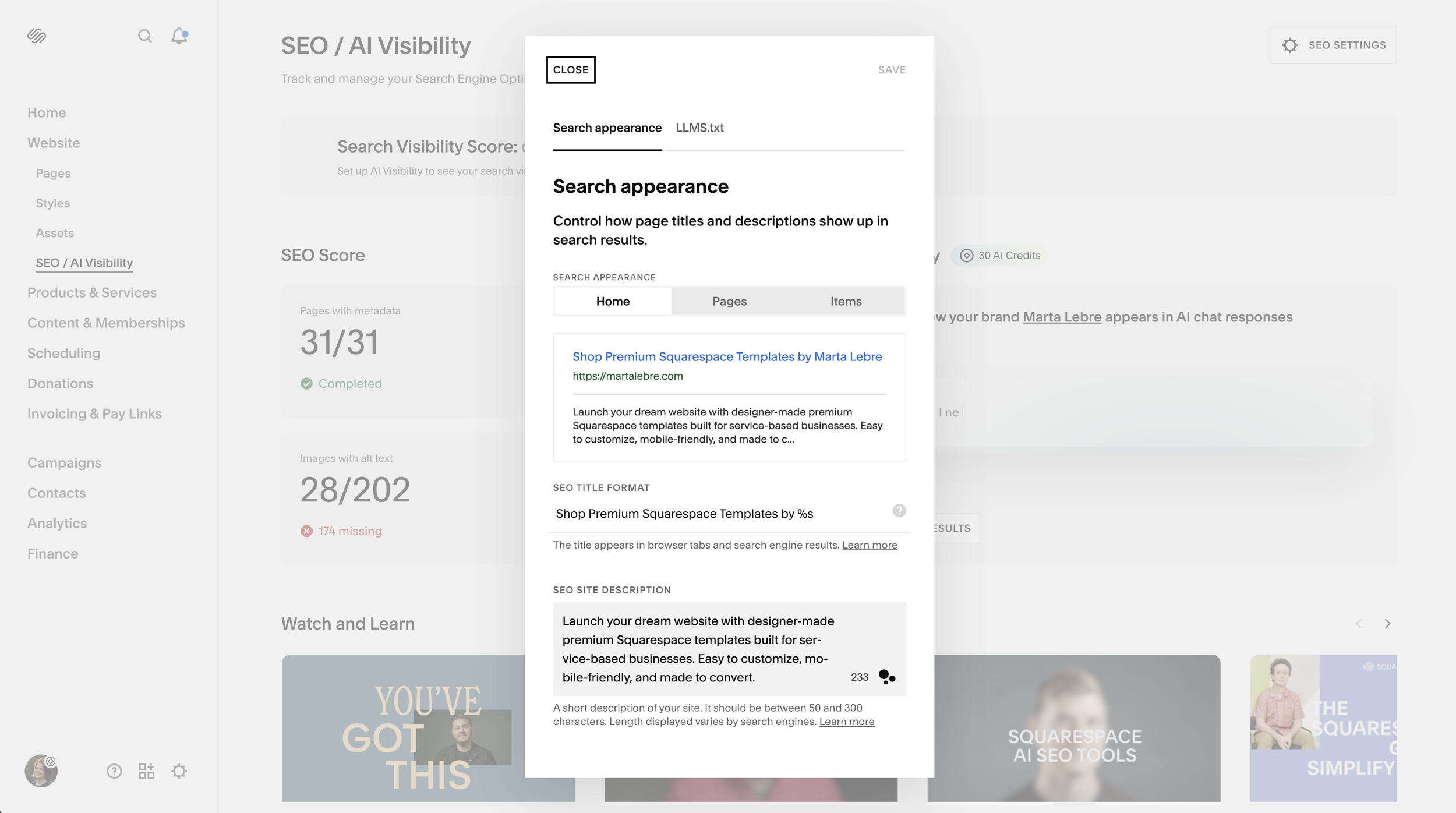
Squarespace has added AI Visibility — a tool designed to show whether your business appears when people search using tools like ChatGPT and Gemini.
Inside the SEO/AI Visibility panel, you can now run both branded prompts (which include your business name) and non-branded prompts (which don't), then see whether your website gets mentioned and where it appears in the results. Squarespace also combines this information with its traditional SEO checks to create a broader search visibility score.
In other words, Squarespace is beginning to treat visibility in AI-generated answers as part of search visibility, rather than treating SEO as Google rankings alone.
Does Squarespace work for AI search?
Yes — but just like traditional SEO, having the feature doesn't mean your website will suddenly start appearing in ChatGPT.
Squarespace itself recommends many of the same things that already make a website easier for Google — and people — to understand:
clear site structure and headings
concise, direct answers to real questions
descriptive metadata and alt text
useful internal organization
natural language rather than keyword stuffing
content formatted with lists, tables and FAQs where they genuinely help
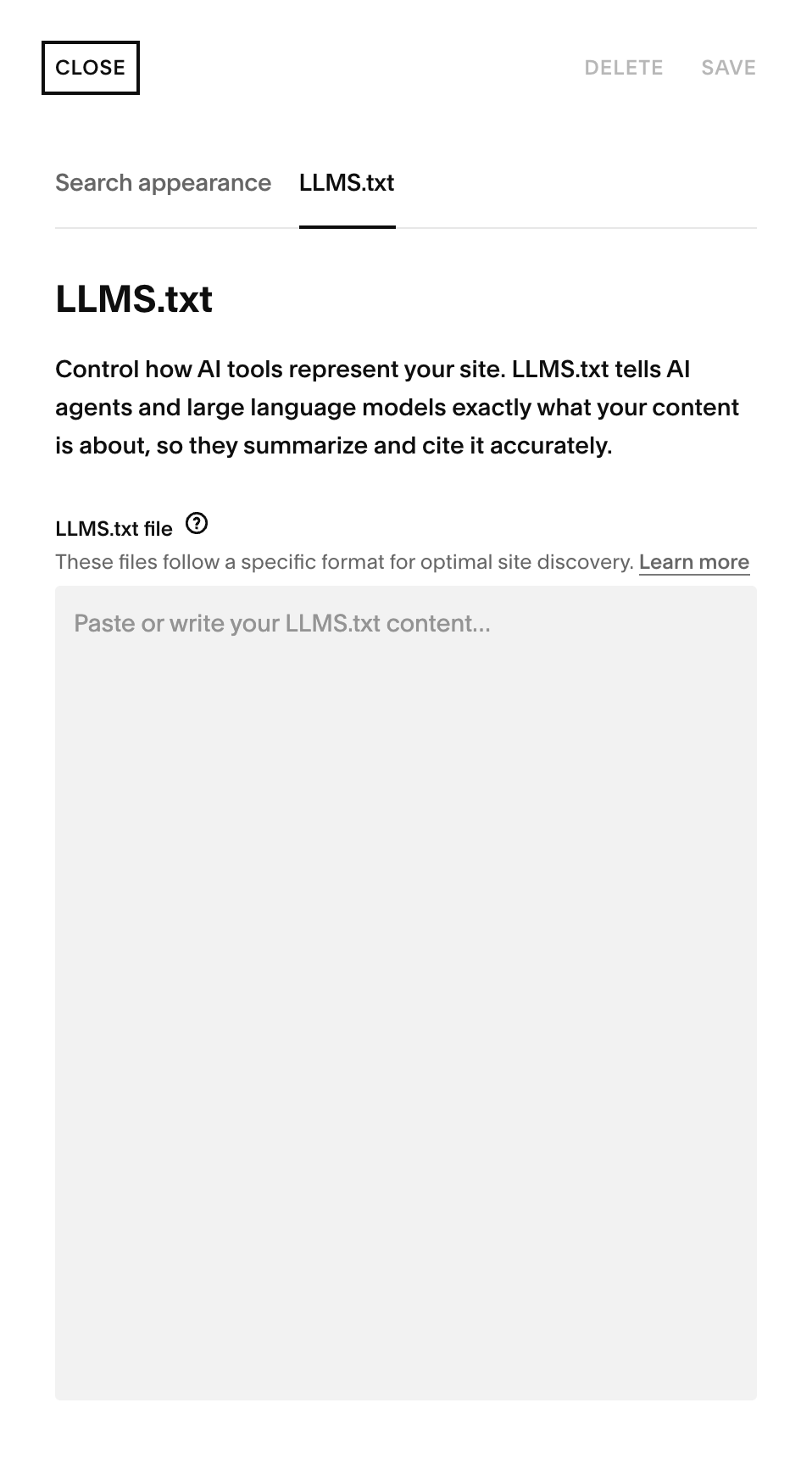
Squarespace also has a Crawlers setting that lets you request that known AI crawlers don't access your site. If appearing in AI search is part of your strategy, you'll generally want to check that you haven't enabled that block accidentally.
And this is where I think the conversation around “AI SEO,” “GEO” and “AEO” gets unnecessarily complicated.
You don't need to create a second website for robots.
The fundamentals haven't suddenly disappeared because people are searching differently. Google, ChatGPT, Gemini and other discovery tools still need to understand what your business does, who it's for, what you know, and whether your content is useful and credible enough to surface.
The technology is changing. The need for a clear, useful website isn't.
That's also why I wouldn't obsess over getting a perfect Squarespace AI Visibility score. It's a useful diagnostic tool — not a business goal. Being mentioned for the right questions by the right potential customers matters considerably more than getting mentioned everywhere.
I'll cover how to optimize a Squarespace website for both traditional and AI search in my complete Squarespace SEO guide.
Where Squarespace Has an SEO Advantage
Squarespace having fewer SEO controls than WordPress isn't always a disadvantage.
For many small businesses, one of its biggest strengths is that a lot of the technical maintenance that can affect SEO simply isn't your problem.
Less technical maintenance
Squarespace manages your hosting, SSL certificate, platform updates, mobile responsiveness and much of the basic technical infrastructure behind the scenes.
You don't need to update your CMS, worry about an outdated plugin breaking something, or discover that your SEO plugin stopped playing nicely with your page builder three months ago.
That doesn't make a Squarespace website automatically well optimized. But it does remove quite a few ways a website can become technically messy over time.
It’s harder to accidentally break things
WordPress gives you considerably more control — which is valuable when you actually need that control.
It also gives you considerably more opportunities to make a mess.
With Squarespace, there are fewer moving parts. For the kinds of business websites I usually work with, that's often a feature rather than a limitation.
It’s easy to actually use
This one gets overlooked in SEO comparisons.
A technically powerful CMS isn't particularly useful if you're afraid to touch it.
Squarespace makes it relatively easy to publish a new article, update an old service page, add internal links, change a heading, improve your copy or create a new page when you discover a search opportunity.
And SEO isn't something you set up once at launch and never think about again.
Websites change. Search behavior changes. Your business changes. New competitors appear. New questions come up.
Being able to improve your website without calling a developer every time is a genuine practical advantage.
For most small and service-based businesses, I'd rather have a slightly less flexible platform they can actually maintain than an infinitely customizable one they can't.
Squarespace SEO Limitations: When It Might Not Be the Best Choice
Squarespace is perfectly capable of ranking well, but that doesn't mean it's the best platform for every website.
There are situations where its simplicity becomes a limitation — particularly when you need much more control over the technical side of SEO.
You need advanced technical SEO control
Squarespace handles a lot of technical SEO automatically. The trade-off is that you can't control everything.
You don't get the same server-level access you'd have with a self-hosted platform. There are also limits to how much control you have over things like automatically generated sitemaps, canonical tags and certain crawling directives.
For the average small business website, I rarely find this restrictive.
For a large or technically complex site where an SEO team wants granular control over how thousands of URLs are crawled and indexed, it can be.
You run a large publishing website
Squarespace works perfectly well for a normal business blog.
If you're running a publication with thousands of articles, multiple authors, complicated taxonomies and a serious editorial workflow, WordPress gives you considerably more flexibility.
The same applies if organic content is essentially the entire business model rather than one part of how your business attracts customers.
You need highly customized functionality
Squarespace allows custom CSS, JavaScript and code injection, and I've built some fairly sophisticated functionality on it.
But there's a point where you're fighting the platform instead of benefiting from it.
If your website needs complex databases, unusual dynamic functionality, deeply customized integrations or extensive backend development, I'd probably choose something else.
You have very complex ecommerce requirements
Squarespace Commerce is more than capable of handling a relatively straightforward online store.
But if you're dealing with a huge product catalogue, complex inventory management, unusual shipping logic, sophisticated filtering, multiple currencies or highly customized checkout requirements, a dedicated ecommerce platform will usually give you more room to grow.
That's not really an SEO problem. It's a question of choosing the right infrastructure for the business.
You want complete control over structured data
Squarespace adds some structured data automatically, and you can add custom JSON-LD when you need more specific schema markup.
That's enough for most of the sites I work on.
But if you're managing a large site with complex, dynamically generated structured data requirements, other platforms can give you more granular control.
None of this makes Squarespace “bad for SEO.”
It means Squarespace has a particular sweet spot.
For a service business, consultant, therapist, designer, wedding venue, vacation rental, small hospitality business or similar company that needs a relatively straightforward website with strong content and good SEO foundations, its limitations are unlikely to be the reason you can't rank.
If you're running the next New York Times, however, I probably wouldn't build it on Squarespace.
Squarespace vs WordPress for SEO: Which Is Better?
If we're talking purely about how much SEO control the platform gives you, WordPress wins.
But that's not quite the same as asking which platform is better for SEO.
WordPress gives you access to a huge ecosystem of SEO plugins, more control over technical configuration, greater flexibility with structured data and much more freedom to customize how a website is built.
Squarespace gives you less control, but handles more of the technical infrastructure for you.
For most small business websites, both are capable of ranking extremely well.
| SEO Feature | Squarespace | WordPress.org |
|---|---|---|
| SEO basics | ✅ Built in | ✅ Usually handled through plugins |
| Technical SEO control | ⚠️ Moderate | ✅ Extensive |
| Sitemap | ✅ Automatic | ✅ Native or customizable with plugins |
| Structured data | ✅ Basic schema automatic; custom JSON-LD possible | ✅ Extensive control through plugins or custom code |
| Server-level access | ❌ Limited | ✅ Full control depends on hosting |
| SEO plugins | ⚠️ Limited ecosystem | ✅ Huge ecosystem |
| Maintenance | ✅ Hosting, security and platform updates managed for you | ⚠️ Hosting, plugins, themes and updates require management |
| Best suited to | Small businesses, service providers and relatively straightforward sites | Large, complex or highly customized websites |
The important distinction is this:
WordPress has a higher SEO ceiling when you need advanced technical control. Squarespace has a much lower barrier to doing the fundamentals properly.
If I'm working on a large publication with hundreds of thousands of URLs and a technical SEO team that wants granular control over crawling, indexing and site architecture, I'd choose WordPress.
If I'm building a website for a therapist, consultant, wedding venue or other service business, having access to .htaccess is unlikely to be the thing that determines whether the business appears in Google.
And having Yoast give every page a green light certainly isn't.
For most businesses, the bigger questions are still what you're trying to rank for, whether you deserve to rank for it, and what happens when the right person actually lands on your website.
If you're deciding between the two platforms rather than specifically comparing their SEO capabilities, I've written a separate Squarespace vs WordPress comparison for that.
Can Squarespace Websites Actually Rank? A Few Real Examples
Yes. And I've seen enough Squarespace sites rank over the years that I don't find this question particularly controversial anymore.
What I find much more interesting is what they rank for — and whether those rankings actually help the business.
A highly specific article that went almost straight to the top
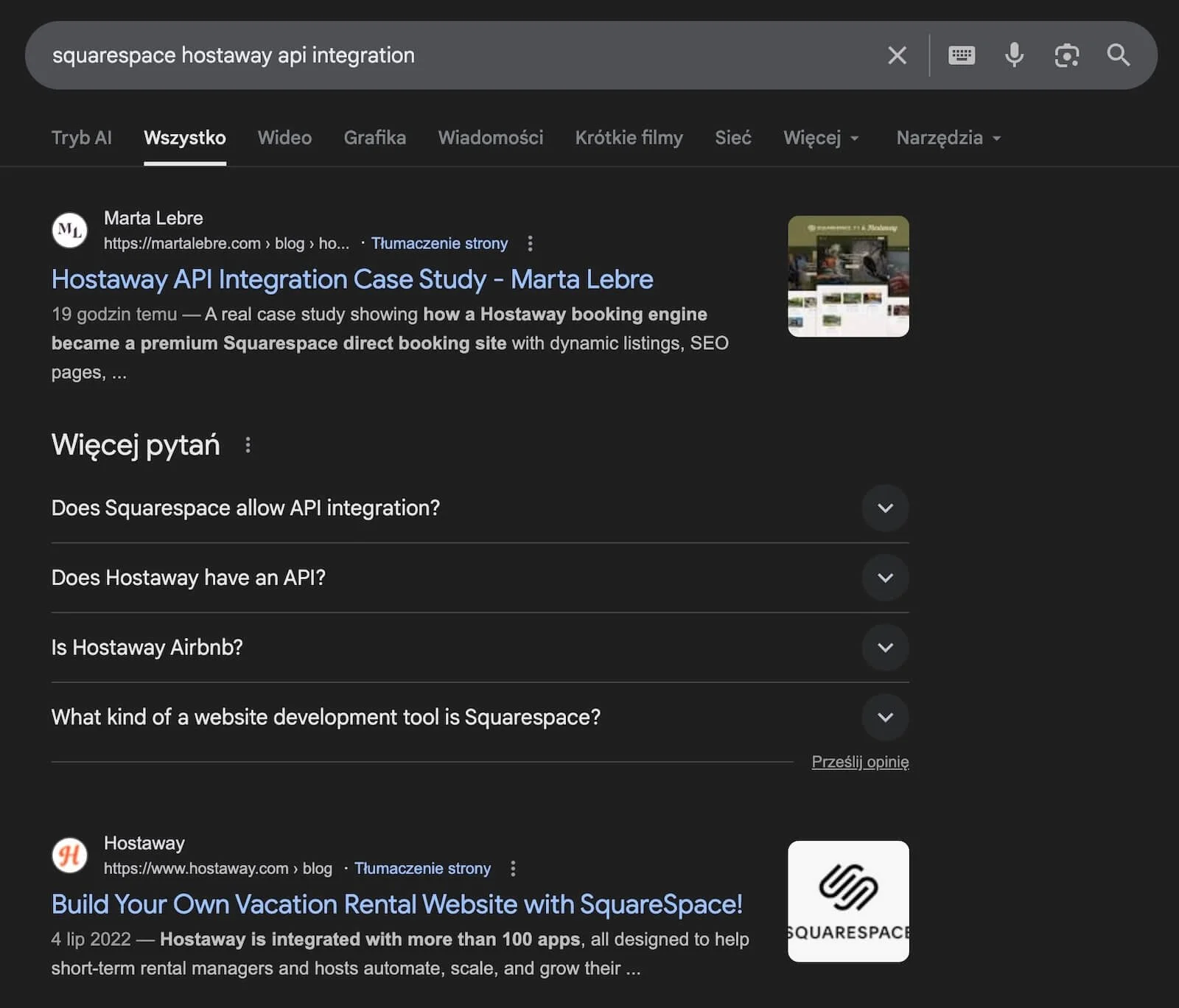
I published an article about integrating the Hostaway API with a Squarespace vacation rental website.
It wasn't targeting some enormous, high-volume keyword. It answered a very specific technical question for a very specific audience — property managers who wanted the design flexibility of Squarespace without giving up their property management system.
Within a relatively short time, the article was ranking around the top of Google for the searches it was written for.
There was no WordPress plugin involved. No elaborate technical SEO setup. The page worked because there was clear search intent, relatively little useful information answering it, and I had first-hand experience with the problem.
That's increasingly the kind of SEO I'm interested in.
Ranking for the wrong thing isn’t a win
I've also seen the opposite.
One therapist website I worked on was getting organic traffic. On paper, SEO was “working.” When I looked at what people were actually searching for, however, much of that traffic wasn't coming from potential therapy clients at all.
The website was visible.
It just wasn't visible to the right people.
That's an important distinction because it's very easy to make SEO reporting look impressive with rankings, impressions and traffic while ignoring whether any of those visitors have a realistic chance of becoming customers.
My own website is another good example
This website ranks for all sorts of things. Some of those rankings are extremely useful to my business. Some have brought thousands of impressions from people who will almost certainly never hire me. And some of my newer, commercially relevant content gets far less traffic but puts me in front of exactly the businesses I want to work with.
That's why I don't judge SEO success purely by whether a page reaches page one.
A ranking is only useful if being found for that search moves the business in the right direction.
Squarespace is perfectly capable of getting you into search results.
The harder — and much more important — job is deciding which search results are actually worth getting into.
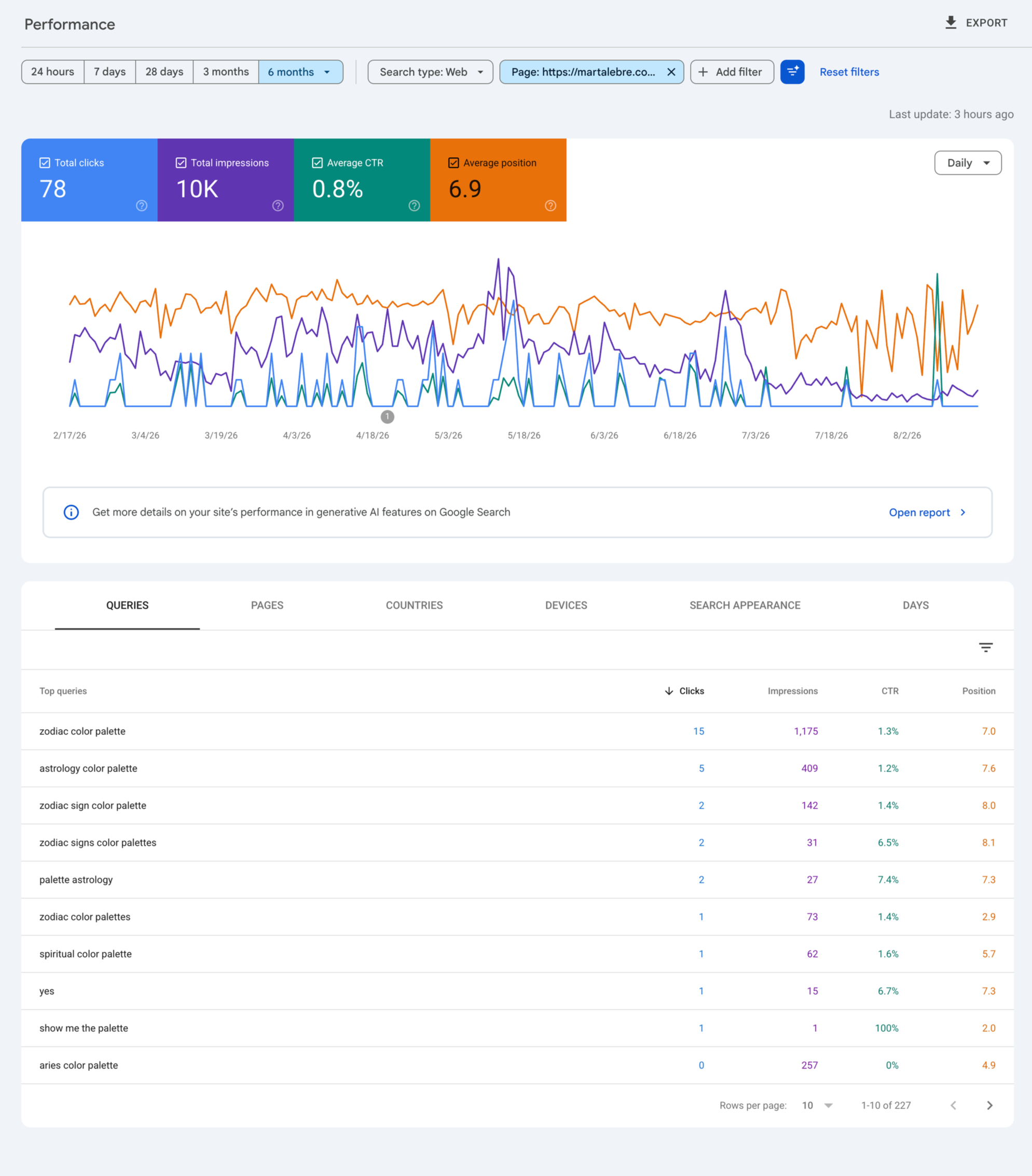
One of my top ranking queries is pretty useless and reflects my old business. Just a reminder that SEO takes time xD
What Actually Determines Whether Your Squarespace Site Ranks?
Once the technical foundations are in place, your choice of platform becomes much less interesting.
Whether a Squarespace website ranks depends on many of the same things that determine whether any other website ranks:
Search intent: Does the page actually answer what someone was looking for?
Relevance: Is it clear what the page — and the wider website — is about?
Content quality: Are you adding something genuinely useful, specific or original rather than publishing another version of what's already ranking?
Site structure: Can search engines and visitors understand how your pages relate to each other?
Internal linking: Are your important pages supported by relevant content elsewhere on the site?
Authority: Does your website have the experience, reputation, mentions and links that give search engines reasons to trust it?
Technical health: Can search engines crawl, index and understand the site properly?
Freshness: Is important content still accurate and maintained where the topic requires it?
Squarespace can give you the infrastructure for all of this.
What it can't do is decide what your business should be known for, what your customers are actually searching for, which searches are worth pursuing, or what information someone needs before they're ready to buy.
That's strategy, not a CMS setting. And it's also why I don't think SEO should be treated as a checklist you bolt onto a finished website just before launch.
If you want the practical side — from keyword research and site architecture to on-page SEO, technical setup and optimizing for AI search — I've put that in my Complete Squarespace SEO Guide.
So, Is Squarespace Good for SEO?
Yes.
For most small businesses and service-based websites, Squarespace gives you everything you need to build a site that can rank well in Google — and increasingly, be understood and surfaced by AI search tools too.
It has limitations. If you're running a huge publishing operation, need extremely granular technical SEO control, or are building something with complex custom functionality, another platform may give you more flexibility.
But for most businesses, Squarespace itself is unlikely to be the reason you're not ranking.
The platform can handle the technical foundations. It can give search engines a crawlable site, an XML sitemap, structured data, editable metadata, redirects and a clear page structure.
What it can't tell you is whether you're targeting the right searches.
And that's the part I think matters much more.
Because getting to page one for a keyword that attracts the wrong people isn't particularly useful. Neither is doubling your organic traffic if those visitors land on a website that doesn't answer their questions, differentiate your business or give them enough confidence to take the next step.
So yes, Squarespace is good for SEO.
But good SEO is much bigger than Squarespace.
Planning a new website? Explore custom website design (with strategy)
Already getting traffic but not sure what’s actually wrong? Apply for a Rabbit Hole Investigation
Interested in Squarespace SEO? Read more here:
Squarespace SEO - FAQs
-
Yes. Squarespace includes the technical SEO foundations most small and service-based businesses need, including editable metadata, automatic XML sitemaps, SSL, mobile-responsive design, redirects, canonical URLs and structured data. Your results will depend much more on your SEO strategy, content, authority and site structure than on Squarespace itself.
-
Yes. Squarespace websites can rank at the top of Google just like websites built on other platforms. The platform doesn't determine your rankings on its own; relevance, search intent, content quality, authority, internal linking and technical health all play a role.
-
WordPress offers more technical control and a much larger SEO plugin ecosystem, making it better suited to some large or complex websites. Squarespace handles more of the technical infrastructure automatically and provides the SEO features most small business websites need. Neither platform automatically ranks better simply because of the CMS being used.
-
Yes. Squarespace includes editable SEO titles and descriptions, automatic XML sitemaps, SSL, mobile-responsive design, custom URLs, 301 redirects, canonical tags, image alt text, structured data and integrations with Google Search Console and Google Analytics.
-
Squarespace websites can appear in AI-generated search results and tools such as ChatGPT and Gemini. Squarespace now also provides AI Visibility tools for monitoring how a business appears in AI search. Visibility still depends on factors such as clear site structure, useful content, authority and making your business and expertise easy for machines to understand.
-
Not necessarily. Many basic Squarespace SEO tasks can be handled yourself. Expert help becomes more useful when SEO needs to work alongside positioning, site architecture, content strategy and conversion — because getting more traffic won't solve the problem if you're attracting the wrong people or your website isn't turning the right visitors into customers.