Why Is My Squarespace Website Not Showing Up on Google?
You launched your Squarespace website. It looks good. It works. You can type the URL into your browser and there it is.
But when you search for it on Google? Nothing.
Or perhaps your website shows up when you search your business name, but nowhere when you search for the service you actually sell. Or — particularly alarming — your Squarespace website used to show up on Google and suddenly doesn't.
These are three very different problems.
And before you start changing page titles, resubmitting your sitemap or frantically Googling “why is my Squarespace website not showing up on Google?”, it's worth figuring out which one you actually have.
Because a website that isn't indexed needs a very different fix from a website that's indexed perfectly well but simply isn't ranking.
Let's figure out what's happening.
First: is your Squarespace website actually missing from Google?
Start with the simplest test.
Go to Google and search:
site:yourdomain.com
Replace yourdomain.com with your actual domain.
For example:
site:martalebre.com
If Google returns pages from your website, congratulations: Google knows your website exists.
That immediately tells us something important.
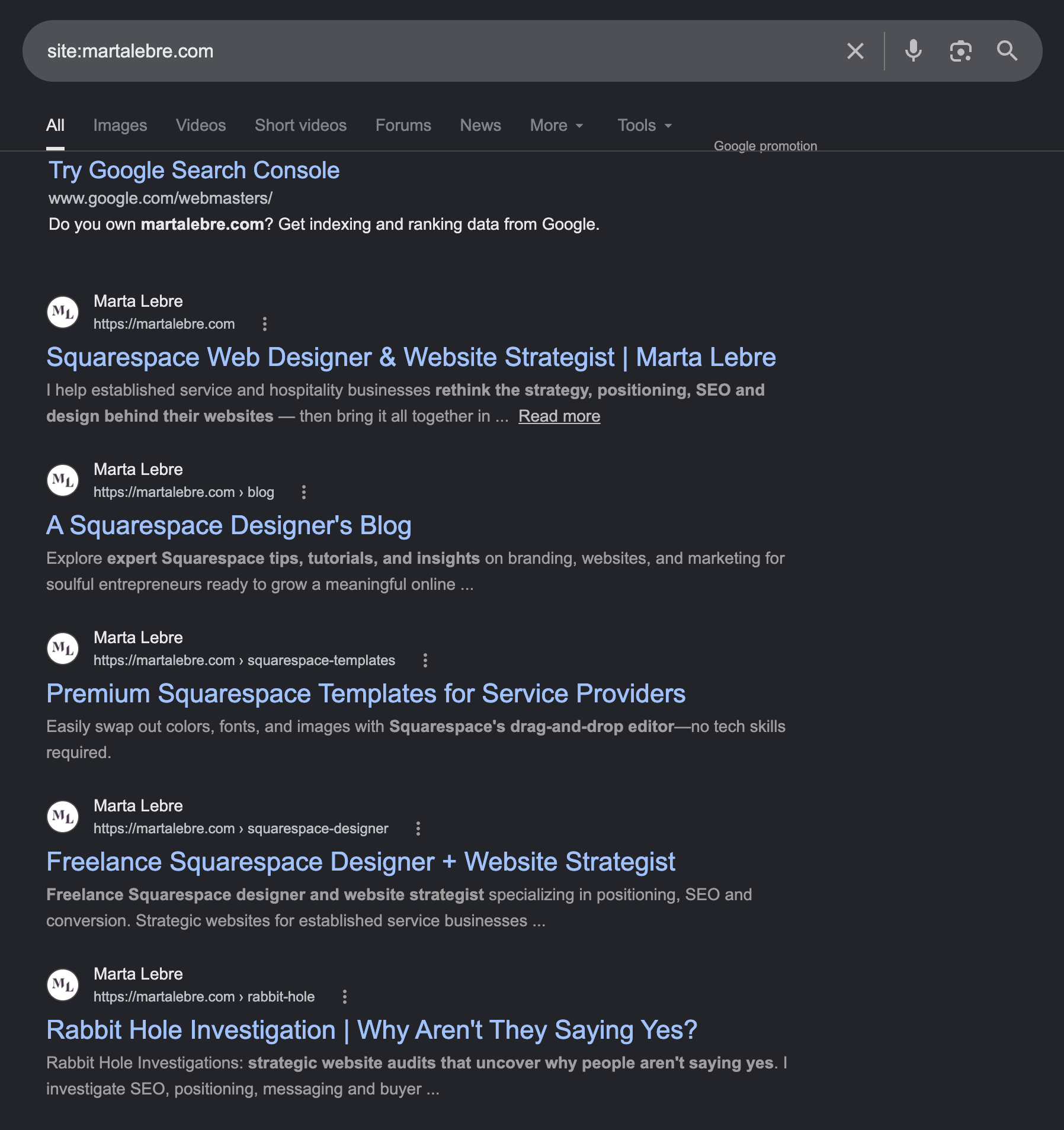
A site:yourdomain.com search is a quick way to see whether Google knows your pages exist. If pages appear here, the problem is usually ranking rather than basic indexing.
If your pages appear
You probably do not have an indexing problem.
If you're searching for something like “interior designer London” or “Squarespace web designer” and can't find your website, the problem is more likely that your pages aren't ranking for those searches.
We'll get to that.
If nothing appears
Now we need to investigate why Google hasn't indexed your Squarespace website.
And that's where I'd start checking your Squarespace settings and Google Search Console.
Why isn’t my Squarespace website showing up on Google?
There isn't one answer. Here are the most common causes I see.
1. Your Squarespace website is brand new
If you've just launched your website, don't panic. Publishing a Squarespace site doesn't instantly put it into Google's search results. Google first needs to discover the website, crawl its pages and decide which pages to add to its index. That can take time, particularly with a completely new domain that has few or no external links pointing to it.
You can help Google discover the site by connecting it to Google Search Console and submitting your sitemap.
Squarespace automatically creates a sitemap for your website at:
yourdomain.com/sitemap.xml
You don't need a plugin or separate sitemap generator. But there's an important distinction here: Submitting a sitemap helps Google discover your pages. It does not make them rank. I see those two things confused constantly.
If Search Console tells you your pages are indexed, submitting the sitemap another six times isn't going to make you suddenly appear on page one.
2. You’ve accidentally hidden your Squarespace website from search engines
Before diagnosing anything complicated, check the obvious.
Squarespace gives you controls over whether your website and individual pages can appear in search.
A setting left over from development, a hidden page or a page deliberately excluded from search can prevent Google from indexing content you actually want people to find.
This is especially worth checking if your website was recently redesigned or built by somebody else.
Check your site's SEO/search visibility settings and the settings of the specific page that isn't appearing.
If you've deliberately excluded a page from search, Google is doing exactly what you asked it to do.
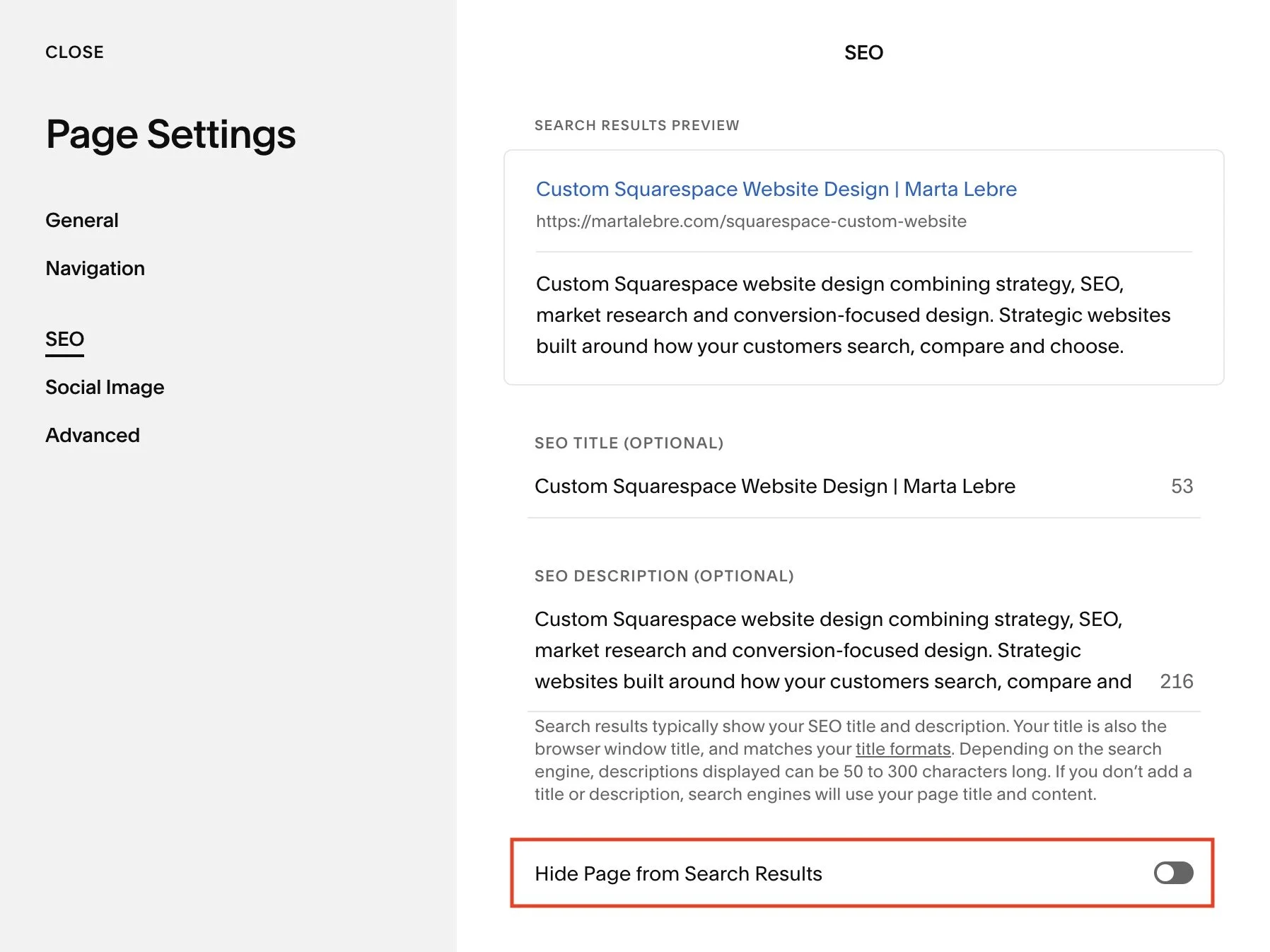
One small Squarespace setting can keep a page out of Google entirely. If a page isn’t appearing in search, this is one of the first things I’d check.
3. Google knows your website exists — it just doesn’t rank
This is probably the biggest misunderstanding around this problem.
Imagine you're a wedding photographer in Boston.
You search:
site:yourphotographywebsite.com
Twenty pages appear.
Then you search:
Boston wedding photographer
…and can't find yourself anywhere.
Your Squarespace website isn't technically “missing from Google.” It's indexed. It just isn't ranking for the search you care about. And that's a completely different SEO problem.
Google has hundreds or thousands of possible pages it could show for a search. Your website has to give it a reason to choose yours.
That means looking at things like:
what each page is actually about
whether it matches the searcher's intent
page titles and headings
content and topical relevance
internal linking
your location, where relevant
external links and authority
competition
the overall structure and quality of the website
Simply having a Squarespace website about photography doesn't mean Google will infer that your homepage deserves to rank for Boston wedding photographer.
Being indexed means you're eligible to compete. It doesn't mean you're going to win.
4. You’re searching for keywords your website isn’t actually targeting
This one happens all the time. A business owner tells me: “My website doesn't show up on Google.”
So I ask: What are you searching for?
And that's where things get interesting.
Let's say you offer bespoke kitchen design in London. Your website talks beautifully about: spaces shaped around the way you live.
Your homepage title says: Home | Studio Name
Your services page says: What We Do
Your copy talks about craft, materiality and creating meaningful homes. Lovely.
But nowhere does the website clearly establish:
Bespoke kitchen designer in London.
Then the owner searches Google for bespoke kitchen designer London and wonders why Google isn't showing the site.
Google isn't a mind reader.
Good SEO isn't about stuffing the phrase bespoke kitchen designer London into every available paragraph, either. It's about making the subject, service, audience and — where relevant — location of a page unmistakably clear.
If I have to spend ten minutes figuring out what your business actually sells, Google may be having the same problem.
5. Your website appears for your business name but not your services
This is actually useful diagnostic information.
If you search:
Your Business Name
and your website appears, Google clearly knows who you are.
But if you search:
Squarespace designer
family therapist Miami
wedding venue Wisconsin
or whatever service you're trying to rank for and disappear completely, you're probably looking at a ranking and relevance problem, not an indexing problem.
Branded search is usually much easier… there may be only one business on the internet with your particular name. But there are potentially thousands competing for your service.
So don't use “I rank when I Google my own name” as evidence that your SEO is working.
Test the searches an actual prospective customer might make.
6. Your page is indexed, but Google doesn’t think it’s the best result
This is where SEO becomes less mechanical. You can do everything “correctly”… Your page is indexed. You have an SEO title. You wrote a meta description, used your keyword, connected Search Console, submitted your sitemap.
And still not rank.
Why?
Because Google doesn't grade your website against a checklist.
It compares possible answers.
If ten other pages answer the searcher's question better, demonstrate stronger relevance, come from more established websites, provide better supporting information or simply align more closely with what Google believes the searcher wants, they can outrank you.
This is why I don't particularly like SEO advice that boils down to:
Put your keyword in your title and H1.
Yes, do that where appropriate, but then look at what's already ranking. What kind of pages are they? What questions do they answer? What does Google appear to believe the searcher wants? What are they doing that your page isn't?
And, most importantly:
Can you create a genuinely better result?
That's SEO.
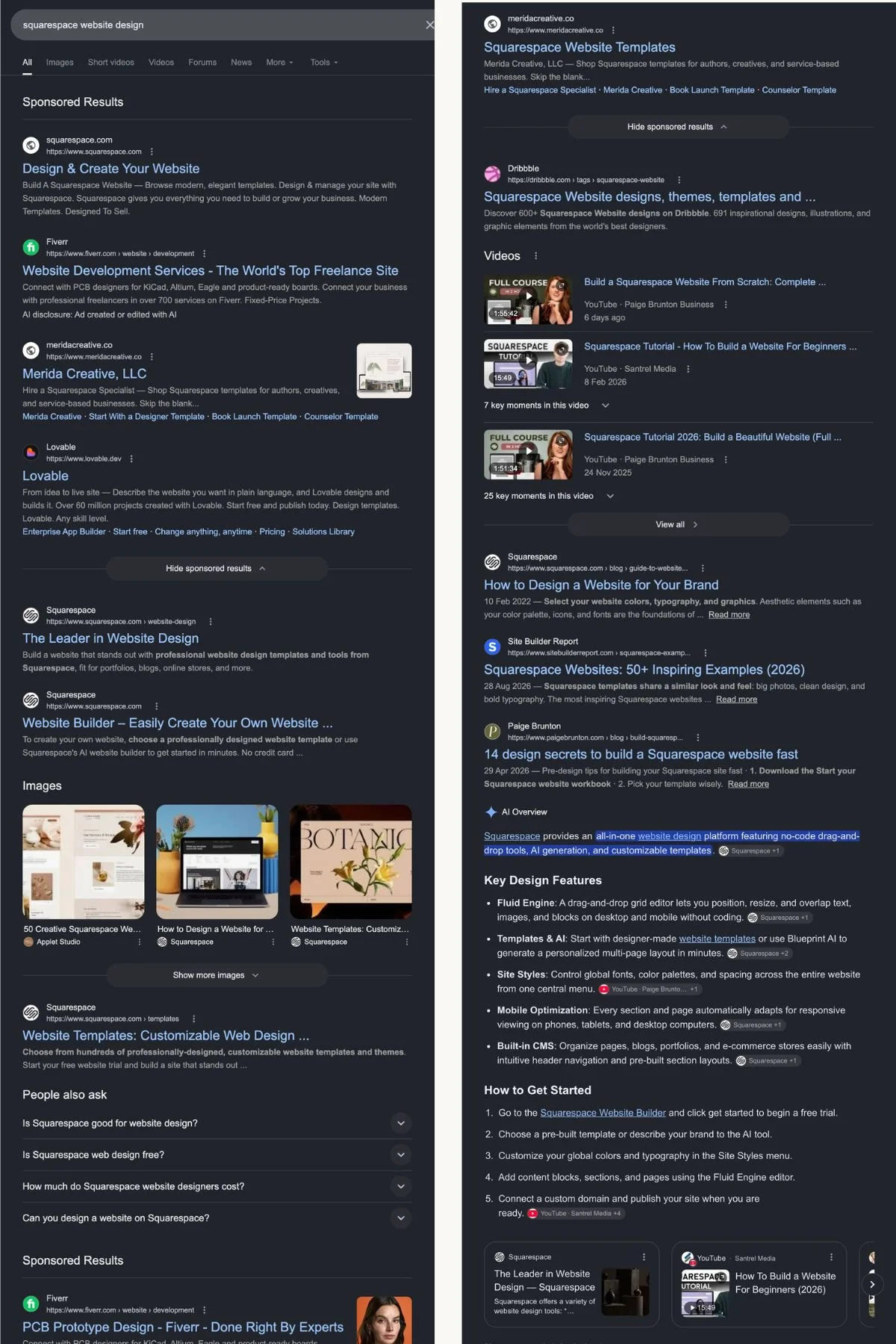
One query, several possible intentions. Google has to decide whether the searcher wants a designer, a DIY website builder, templates, inspiration or a tutorial — then choose the result it thinks will satisfy them best.
7. Google has indexed the wrong page
Here's a slightly sneakier problem.
Suppose you have:
Homepage: Squarespace Website Design
Service page: Squarespace Website Design Services
Blog post: Why Squarespace Is Great for Website Design
Another blog post: How Much Does Squarespace Website Design Cost?
You intended the service page to rank. Google may disagree. Sometimes multiple pages are similar enough that Google struggles to determine which one is the strongest result for a particular search. You might see pages swapping positions, a blog article appearing instead of your service page, or none of them performing particularly well.
This is often called keyword cannibalization, although I think that term gets thrown around much too casually.
Two pages mentioning the same subject doesn't automatically mean they're cannibalizing each other.
But if several pages are trying to perform essentially the same job for essentially the same search intent, your site architecture may need some work.
8. Your page is too thin to satisfy the search intent
Sometimes Google has no trouble finding, crawling or indexing your page. There just isn’t enough there. And by “thin,” I don’t necessarily mean short because a 500-word page can answer a simple question perfectly well. A 2,000-word page can still be thin if it says very little. The real problem is whether the page gives somebody searching that query enough useful information to satisfy what they came for.
Imagine you want to rank for:
wedding venue in Wisconsin
…but your venue page contains a beautiful hero image, three paragraphs about unforgettable celebrations, a gallery and a contact button.
A couple searching for a venue may also want to know:
where the venue is
how many guests it accommodates
whether ceremonies can happen indoors and outdoors
what happens if it rains
whether accommodation is available
what’s included
what kind of weddings the space suits
how pricing works
what the venue actually looks like during a real wedding
Google clearly understood what the page was about.
The problem was that relevance alone wasn’t enough. For the real, competitive search, the page didn’t satisfy the search intent strongly enough to beat the alternatives.
A page can be optimized, indexed, and clearly relevant — and still not be competitive enough for the real search.
I recently saw a perfect example of this with a client whose website was technically well optimized and ranked in the top three when I searched her target keyword in quotation marks — but disappeared from the results when I searched the same phrase normally.
If competing pages answer those questions and yours doesn’t, adding the keyword wedding venue Wisconsin to your H1 isn't going to solve the problem. Your page may be optimized, it just may not be a very satisfying result. Useful content depth comes from answering the searcher's actual questions — not hitting an arbitrary word count.
I saw this firsthand in my Squarespace SEO case study, where I managed to rank a highly specific post at the top of Google in 24h.
9. Your Squarespace website used to rank on Google — and now it doesn’t
This deserves its own category. If your website used to show up on Google and has suddenly dropped, don't treat it like a brand-new website. Google already discovered you but something changed.
Start by looking at Google Search Console rather than guessing.
Did:
impressions decline?
average positions fall?
one page lose visibility or the whole website?
one group of queries disappear?
the decline happen suddenly or gradually?
Google start ranking a different URL?
the drop coincide with a Squarespace website redesign or migration?
Those clues matter enormously.
Recently redesigned your Squarespace website?
Pay particular attention here.
Changing page URLs without redirects, deleting useful content, changing site architecture, rewriting pages without considering what they previously ranked for, or moving from another platform incorrectly can all damage existing search visibility.
A prettier website isn't automatically a better-performing website.
I've seen businesses redesign sites that were already bringing in search traffic and accidentally throw away the very things Google valued about them.
If you're redesigning a Squarespace website that already ranks, SEO needs to be part of the redesign before the new site goes live, not something you bolt on afterwards.
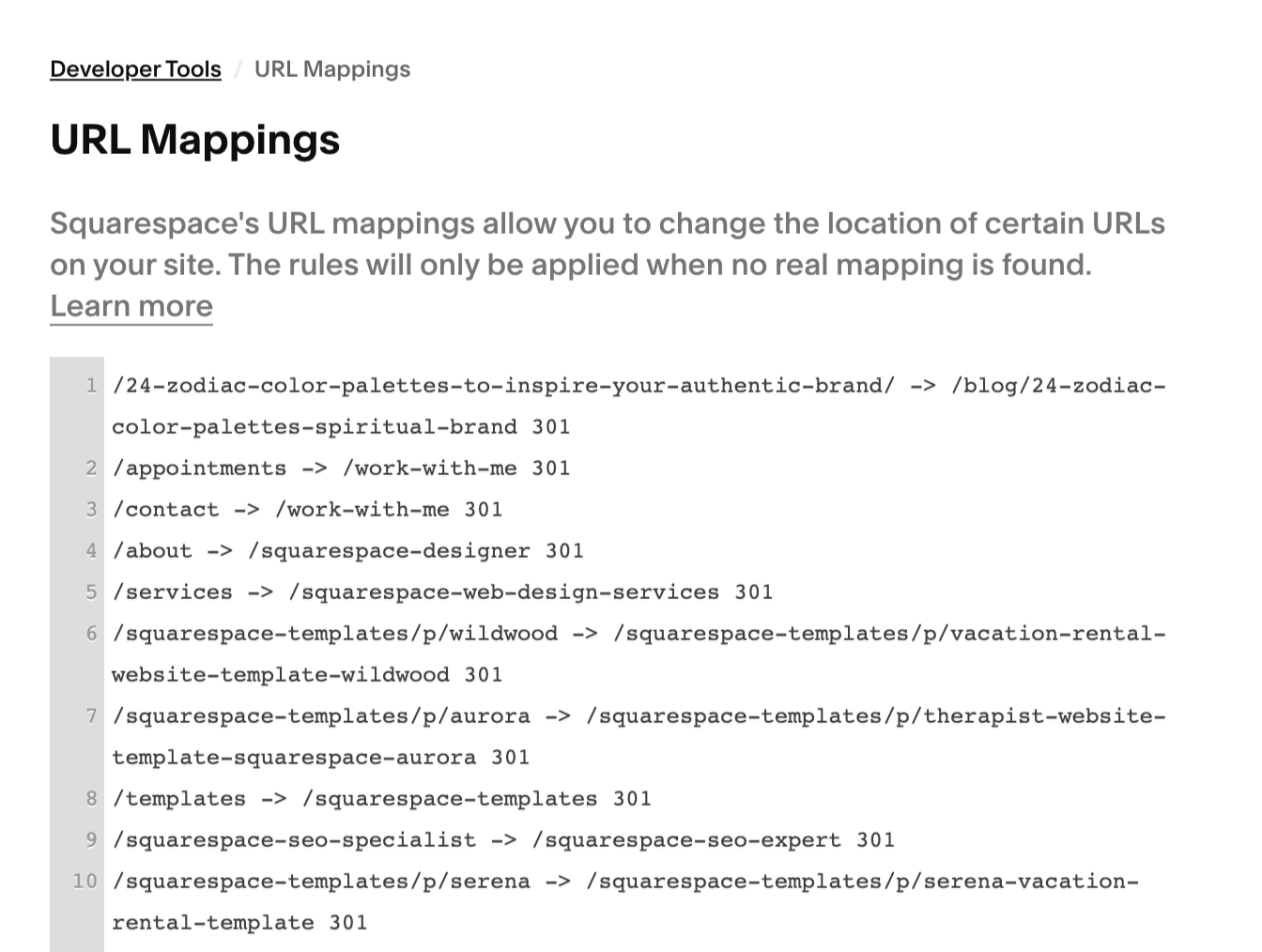
When URLs change, 301 redirects help Google understand where the old pages moved. Without them, a redesign or migration can throw away existing search visibility.
10. You changed your domain without redirecting it or moved to Squarespace
If you've recently moved your website from WordPress, Showit, Wix or another platform to Squarespace, Google has more to process than a visual redesign. URLs, site structure, content and internal links may have changed. Not to mention the lost authority.
Google needs to understand where the old pages went and what replaced them.
This is where 301 redirects become particularly important.
If:
oldwebsite.com/services/wedding-photography
becomes:
newwebsite.com/weddings
Google needs a clear path between them, otherwise you're essentially deleting one URL and asking Google to discover an unrelated new one. Platform migrations can be done without destroying your SEO.
But they need to be treated as migrations — not just design projects.
11. Your site has very little authority yet
Sometimes there isn't a broken setting, you're simply new.
Imagine two equally useful pages about the same subject. One sits on a website Google has known for eight years, which has been mentioned and linked to by reputable websites across its industry. The other went live three weeks ago and exists on an island.
Google has considerably more evidence about the first business, which doesn't mean you need to buy 500 backlinks from somebody who emailed you at 3am promising “DA 70 SEO LINKS.” Please don't.
But genuine mentions matter.
Depending on the business, those might come from:
professional directories
industry associations
local organizations
press
podcasts
partners and suppliers
venues
publications
genuinely useful content people reference
SEO doesn't happen entirely inside Squarespace.
12. Your local business isn’t sending Google enough local signals
If you run a business serving a particular geographical area, your website is only one piece of the puzzle. Your Google Business Profile can be enormously important for local searches. Your website should also make your location and service area genuinely understandable where appropriate.
Not by creating 47 nearly identical pages saying:
Wedding photographer in Chicago
Wedding photographer in Evanston
Wedding photographer in Oak Park
Wedding photographer in Naperville...
That's not a strategy I'd recommend.
Instead, make the real geographical relationship between your business and your customers clear.
Where are you based?
Where do you genuinely work?
What places appear naturally in your portfolio, testimonials, case studies and content?
Local relevance should reflect the actual business.
How long does it take for a Squarespace website to show up on Google?
There's no guaranteed number of days. Google may discover some new websites quickly, while others take longer. But I wouldn't obsess over the calendar. I'd look at what Google is actually doing.
If your new page isn't ranking on day three, that's not particularly interesting.
If Google Search Console shows that it has crawled and indexed the page, the question has already changed from:
“Has Google found me?”
to:
“Why isn't Google ranking me?”
And waiting another six months won't necessarily fix the second problem.
How do I get Google to index my Squarespace website?
For a new Squarespace website, I'd start with the basics:
Make sure the site and important pages are available to search engines.
Set up Google Search Console.
Submit your Squarespace sitemap.
Inspect important URLs in Search Console.
Make sure your pages are internally linked and discoverable.
Check that Google can access the canonical version of your domain.
Give Google some time to crawl a genuinely new website.
But again: indexing is only step one. If Search Console says the URL is indexed, stop trying to solve an indexing problem you don't have. Start investigating rankings.
How to find out why your Squarespace website isn’t ranking
This is where Google Search Console becomes considerably more useful than repeatedly Googling yourself.
Open the Performance report.
Look at:
Queries — What searches are already triggering your website?
Pages — Which pages are receiving impressions?
Impressions — Is Google showing your pages even when nobody clicks?
Position — Are you sitting at #12, #38 or #92?
Clicks — Which searches actually bring visitors?
This can reveal something very different from “Google hates my website.”
For example, you might discover that your service page has:
0 clicks
1,800 impressions
average position: 16
That's not an invisible website.
That's a website sitting tantalizingly close to page one.
And I'd approach that very differently from a page Google hasn't indexed at all.
Don’t diagnose your SEO by Googling yourself
This deserves mentioning because almost everyone does it.
Searching your own keywords manually can be useful for looking at the search results.
It's not a particularly good SEO reporting system.
Results can vary based on location, device, language and other context.
And searching one keyword tells you nothing about the hundreds of other queries for which Google may be testing or displaying your pages.
Use Search Console to understand your actual search visibility.
Then use Google itself to understand the competition.
Is Squarespace bad for SEO?
No. If your Squarespace website isn't showing up on Google, I wouldn't assume the platform itself is the problem.
Squarespace gives you the fundamental technical infrastructure needed for the vast majority of small-business SEO: indexable pages, editable SEO titles and descriptions, clean URLs, automatic sitemaps, redirects, structured content and more.
The bigger limitations I encounter tend to be strategic rather than “Squarespace can't rank.”
The website hasn't been built around how people search.
Pages don't have clear jobs.
Services aren't properly separated.
The copy is vague.
The business is targeting wildly unrealistic keywords.
A redesign removed valuable content.
Or nobody investigated what was already working before changing everything.
A Squarespace website can absolutely rank on Google (mine does), Squarespace can't decide what your SEO strategy should be for you. Sometimes the problem isn’t that Squarespace can’t rank — it’s that the site needs more strategic Squarespace SEO help to figure out what Google is seeing, what’s missing, and which pages actually have the best opportunity to rank.
If you’re wondering more broadly whether Squarespace can rank, I’ve written a full guide on whether Squarespace is good for SEO.
A quick diagnostic: why isn’t your Squarespace website showing up?
Here's where I'd start.
| What You’re Seeing | Most Likely Problem |
|---|---|
Nothing appears for site:yourdomain.com |
Crawling or indexing |
Pages appear with site: but not your business name |
Indexing, entity or new-site issue worth investigating |
| You rank for your name but not your services | Relevance, ranking or competition |
| One important page is missing | Page-level indexing or technical issue |
| The wrong page ranks | Search intent, site architecture or keyword cannibalization |
| You get impressions but almost no clicks | Rankings and/or search snippet |
| Rankings dropped after a redesign | Migration or redesign SEO issue |
| Rankings gradually declined | Content, competition, authority or a broader SEO issue |
| You’re #11–20 for important searches | Potentially a very good SEO opportunity |
That last one is particularly interesting.
You don't necessarily need Google to “discover” you.
You may already be much closer than you think.
Still can’t figure out why your Squarespace website isn’t showing up?
Sometimes the answer is obvious: a page was hidden from search engines, the website launched four days ago., Google hasn't crawled it yet. Great. Fix it and move on.
And sometimes I open Search Console and think: Huh. That's weird.
The site is indexed. The pages look optimized. Google is giving them impressions. Competitors aren't obviously stronger. Something changed six months ago. One completely unexpected page is ranking. Or the problem that looked like SEO turns out not to be an SEO problem at all.
Those are my favourite ones.
That's why I created Rabbit Hole Investigations.
You give me the question that's bothering you — Why did my traffic disappear? Why isn't this page ranking? Why are competitors beating me? Why isn't this website generating enquiries? — and I investigate it.
I look at your website, Google data, competitors, search results, positioning, customer journey and whatever other trail the evidence sends me down.
Not a generic 50-point SEO checklist.
Not an automated audit telling you that seven images are 34KB too large.
An investigation into what is actually happening — and what I'd do next.